
Need bespoke music for campaigns or videos, but commissioning composers or vocalists feels slow and expensive? Traditional timelines required DAW expertise, live instruments, and careful mixing. Recent AI advances, however, are collapsing that barrier.
MiniMax’s Music 2.0 model—launched in October 2025—turns natural-language prompts (and optional lyrics) into full compositions with vocals. You describe genre, mood, and structure; the system returns a ready-to-use track.
This guide distills the official MiniMax article so you can understand what Music 2.0 is, what it excels at, how to operate it, what it costs, and where to be cautious before rolling it into production.
Table of Contents
- Music 2.0 Overview vs. Traditional Workflows
- Key Features and Strengths
- How to Use Music 2.0
- Pricing & Plans
- Business Use Cases
- Implementation Checklist
- Conclusion
Music 2.0 Overview vs. Traditional Workflows
Source: https://www.minimax.io/news/minimax-music-20
Music 2.0 is MiniMax’s cloud-based model that generates instruments and vocals from text prompts plus optional lyrics. “Upbeat J-pop with an earworm chorus sung by a female vocalist,” for example, outputs a completed track in minutes.
Earlier AI tools typically produced backing tracks only, required manual looping, or delivered robotic voices. Music 2.0 closes those gaps by synthesizing expressive vocals, tighter song structure, and cohesive arrangements so non-musicians can ship “finished” songs.
Key Features and Strengths
Understanding the capabilities through specific evaluation axes makes buy-in easier.
High-Quality Vocal Generation
Music 2.0’s biggest draw is its vocals. The tone feels human, with deliberate breath, vibrato, and dynamic control. It supports multiple languages (including Japanese and English), so the generated singer can carry emotionally rich performances without hiring talent.
Genre and Style Flexibility
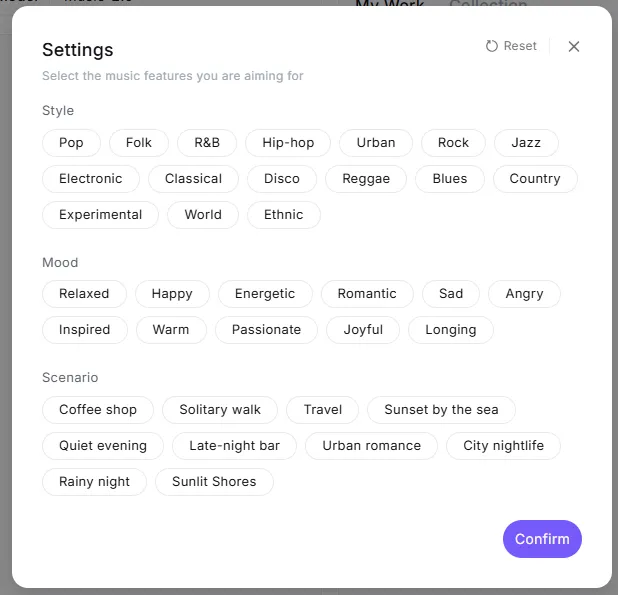
The model isn’t locked to one genre. Pop, jazz, blues, rock, folk, duets, and a cappella all work—and you can switch styles mid-track (e.g., verse as a ballad, chorus as a rock anthem). Music 2.0 handles stylistic instructions with pro-level vocal technique.
Song Structure & Arrangement Control
Beyond melody and chord progressions, Music 2.0 understands song form. It can build intro → verse → chorus → bridge → outro structures up to ~5 minutes long, with memorable hooks. Prompt-level directives control individual instruments—“stronger piano,” “add a guitar solo,” etc.—so arrangements feel layered rather than loop-based.
Studio-Grade Sound Quality
Output quality improved over earlier MiniMax releases. Vocals sit cleanly in the mix, reverbs feel intentional, and instruments occupy their own space. When you generate a disco track, it carries the punch and width you would expect from a studio master, so the audio is usable in live events or branded content without extra mastering.
Comparison Highlights
| Capability | Legacy AI / Manual Workflow | MiniMax Music 2.0 |
|---|---|---|
| Vocal realism | Robotic, limited emotion | Human-like tone with nuanced expression |
| Genre coverage | Narrow; vocals often unsupported | Pop, jazz, blues, rock, folk, duets, a cappella |
| Style shifts in one song | Requires manual editing | One vocalist can shift styles mid-track |
| Song structure | Loop-heavy, lacks arcs | Up to 5-minute compositions with clear hooks |
| Arrangement depth | Needs human arranger | Prompt-level control over instrument intensity/solos |
| Audio fidelity | Demo quality, needs remastering | Studio-grade mix with spatial depth |
| Ease of production | Requires DAW skills & instruments | Prompt + optional lyrics, no DAW required |
How to Use Music 2.0
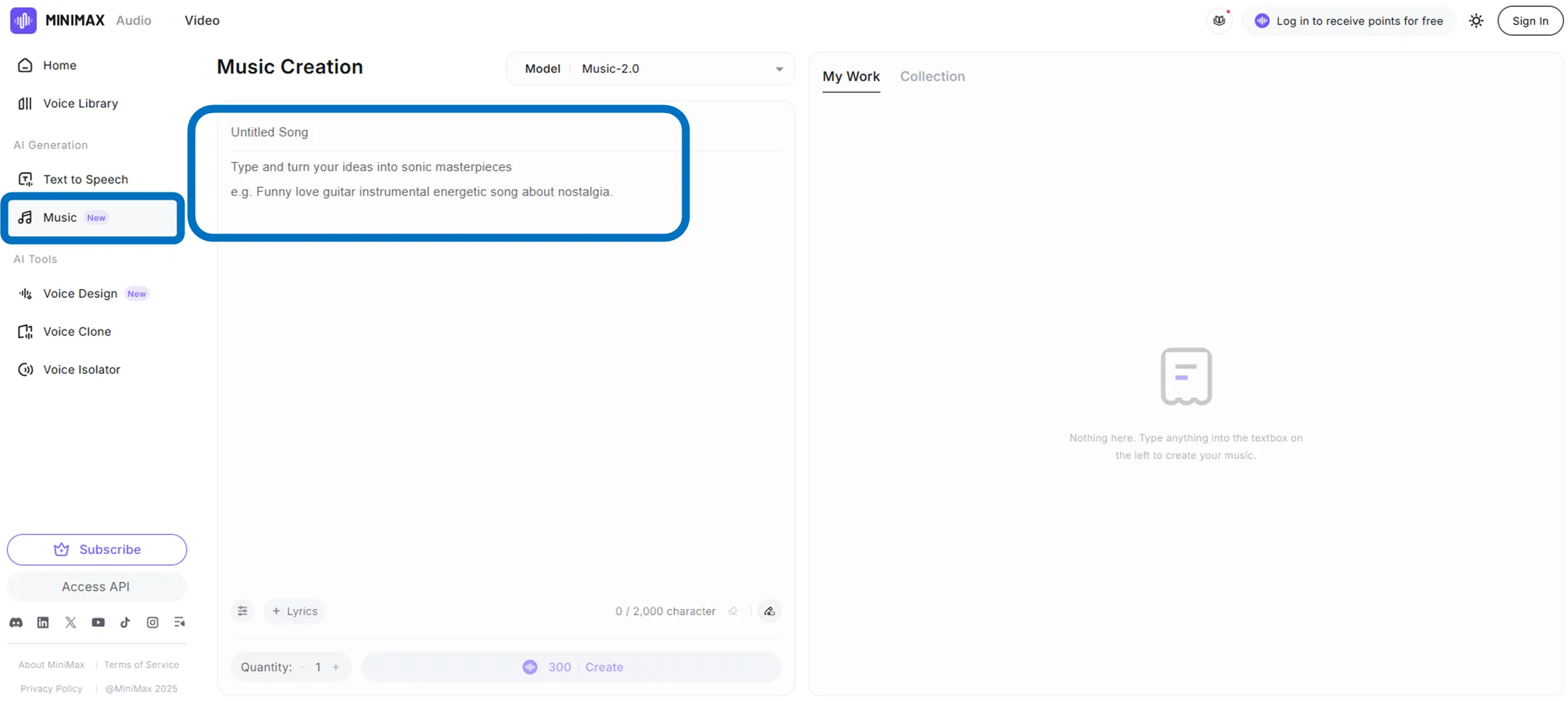
- Create a free MiniMax account and open the Music workspace.
- Describe the track in natural language—genre, mood, tempo, vocalist gender, etc.
- Paste lyrics if you have them (tag sections like
[verse]or[chorus]for better alignment). - Click Create. The model parses prompts/lyrics, then renders a vocal track plus instrumentation in under a few minutes.
- Preview, adjust prompts if needed, and download in MP3 or WAV once satisfied.
- Developers can hit the REST API instead: send the same payload via JSON/curl, receive a binary audio response, and embed generation into internal tools or consumer apps.
Pricing & Plans
Music 2.0 offers two billing models so you can start small and scale:
- Pay-as-you-go: About $0.03 per song (up to ~5 minutes) when calling the API. Perfect for pilots or sporadic needs.
- Subscriptions: Cheaper per-credit costs plus API concurrency and priority perks for heavier use.
| Plan | Monthly (USD) | Monthly Credits |
|---|---|---|
| Starter | $5 | 100,000 |
| Creator | $15 | 250,000 |
| Standard | $30 | 600,000 |
| Pro | $99 | 2,200,000 |
Credit pricing trends downward as you move up tiers, so high-volume teams see the best unit economics. MiniMax occasionally runs trial promotions—check the official billing page for current offers.
Business Use Cases
- Advertising themes: Rapidly craft vocal tracks tailored to campaign narratives and swap lyrics per market.
- Video & social ops: Generate bespoke BGM/jingles for each YouTube or Shorts concept, including vocal mockups during pitching.
- Events & retail: Produce long-form BGM that matches event themes or dayparts; regenerate variants to avoid fatigue.
- Games & apps: Generate scene-specific cues throughout prototyping and production without sourcing external libraries.
These short-turn, multi-version contexts are where AI-composed music shows the biggest ROI.
Implementation Checklist
- Rights & licensing Most paid tiers grant commercial usage, but always confirm plan-specific terms. As with any generative model, double-check that outputs don’t inadvertently mimic existing songs before distributing.
- Data handling If you upload lyrics or future reference audio, remember that data lives on third-party servers. Mask confidential project names, and control where interim demos get shared.
- Prompt craft Quality varies with directive clarity. “Cool track” yields generic results; “BPM ≈ 90, piano-led verses, strings swell in the chorus” produces richer compositions. Teams report that emotional punch improves when prompts explicitly state dynamics and motifs—iterating on prompts becomes a new form of songwriting.
With those guardrails in place, Music 2.0 becomes a powerful partner. Keep rights reviews and listening tests in the loop for commercial releases.
Conclusion
MiniMax Music 2.0 democratizes fully produced, vocal-ready songs. Tasks that once demanded specialized composers now collapse into prompt writing, letting creative and marketing teams own their sonic identity. Start with a pay-as-you-go test, validate the mix quality and workflow fit, then graduate to a subscription once it proves its worth inside your pipeline.