
As demand for short-form video content surges, AI-powered video creation tools are gaining significant attention. PixVerse, in particular, has become widely adopted worldwide as a platform that can generate compelling videos from photos or text in seconds. With no need for specialized editing skills, businesses and individuals are increasingly incorporating it into their content creation and marketing workflows.
This article provides an organized overview of PixVerse, including its key features, pricing structure, usage workflow, official examples, and important considerations for implementation.
Table of Contents
- PixVerse Overview
- Key Features
- Pricing Plans and Comparison
- Usage Workflow
- Latest Examples from Official X Posts
- Implementation Considerations
- Summary
PixVerse Overview

Source: https://app.pixverse.ai/onboard
PixVerse is an AI video generation service developed by Chinese company AISphere. The global version was released in 2024, and the platform has already surpassed 40 million users. Accessible through web browsers and apps, PixVerse can create short-form videos simply by entering text or uploading images.
While traditional video editing required specialized software and skills, PixVerse uses AI to automatically generate motion and effects, allowing users to complete videos with just a few clicks.
Key Features
PixVerse is not just an automated video generation tool—its greatest strength lies in enabling anyone to handle advanced visual expression with just a few clicks. The specific features can be organized as follows:
Text-to-Video Generation
This feature’s main characteristic is its ability to directly visualize ideas written in words.
-
AI understands the input text and expresses it as visual scenes.
-
For example, entering “a cat walking on a sunset beach” will generate a short animation of exactly that.
-
It’s also suitable for “bringing ideas to life” in the early stages of storyboarding and planning.
This allows you to convert ideas that are hard to convey through text alone into intuitive videos that can be easily shared.
Image-to-Video Generation
This feature is useful when you want to create naturally moving footage from static images.
-
Upload photos or illustrations, and they’ll be converted into videos where subjects move naturally.
-
A variety of movements are available, such as smiling and waving, walking, or making eye contact with the camera.
-
The transition feature allows you to specify different reference images for the first and last frames, enabling intentional control over how the footage begins and ends.
This makes it possible to transform static images into dynamic footage that leaves a stronger impression.
Diverse Templates and Effects
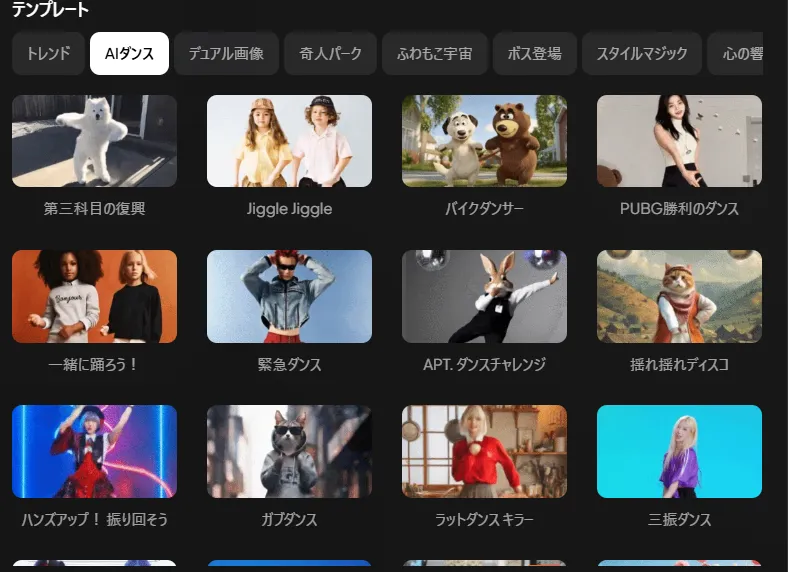
The template feature demonstrates its effectiveness when you want to attract attention on social media.
-
Includes many one-click video templates trending on social media, such as “AI Kiss,” “AI Hug,” and “AI Muscle.”
-
Can generate clips resembling short movies from a single photo.
-
Special effects (neon, Ghibli-style, battle staging, etc.) are also available, enabling the creation of impactful videos in a short time.
This allows you to quickly realize trending expressions without special editing skills.
Fast and Consistent Generation
Generation speed and visual consistency are also among PixVerse’s strengths.
-
The latest model can render a video in as little as 5 seconds.
-
Technology has been introduced that maintains consistency in hairstyle and clothing even when moving the same character across multiple clips.
-
Achieves smooth footage that suppresses the discomfort typical of traditional AI video, such as “becoming a different person in each frame.”
As a result, you can obtain natural, high-quality footage in a short time that can withstand promotional use.
Editing Features and Customization
A flexible system is in place for adjustments and additional effects after generation.
-
You can apply additional effects to generated videos or combine multiple clips into one piece.
-
The “Magic Brush” feature allows you to brush-specify parts of a video and add arbitrary movements.
-
It also serves as a simple video editing software.
This flexibility makes it possible to create footage with originality, going beyond mere automatic generation.
Additional Notable Features (Extend / Sound Effects / Vocals / Restyle / Character)
PixVerse also includes features that further expand the video experience.
-
Extend Can naturally extend the length of generated videos, smoothly making short clips longer.
-
Sound Effects Can enhance the sense of presence by combining sound effects.
-
Vocals Can synchronize voices and lip movements to make character speak.
-
Restyle Can convert already-generated videos to different styles (anime-style, cinematic, etc.).
-
Character Can apply consistent actions across multiple clips while maintaining a specific character’s appearance and characteristics.
These features are a major attraction, allowing PixVerse to be used as a “video production platform” that goes beyond video generation.
As described above, PixVerse has the strength to be utilized in a wide range of situations, from quickly shaping ideas at the planning stage to effective communication on social media.
Pricing Plans and Comparison
While PixVerse can be used for free, paid plans are available for more serious use. The main plans are organized as follows:
| Plan | Monthly Price | Credits | Resolution | Key Features |
|---|---|---|---|---|
| Free | $0 | 60 credits daily | Standard quality | Includes watermark |
| Standard | $10 | 1,200 credits/month | 720p | 3 concurrent generations, no logo |
| Pro | $30 | 6,000 credits/month | 1080p | Fast generation, batch processing support |
| Premium | $60 | 15,000 credits/month | 1080p | 8 concurrent generations, enhanced cost discount |
While it’s possible to generate a few videos daily with the free plan, paid plans are more efficient for marketing and continuous use.
Usage Workflow
PixVerse enables intuitive operation. The basic usage flow is as follows:
Account Registration
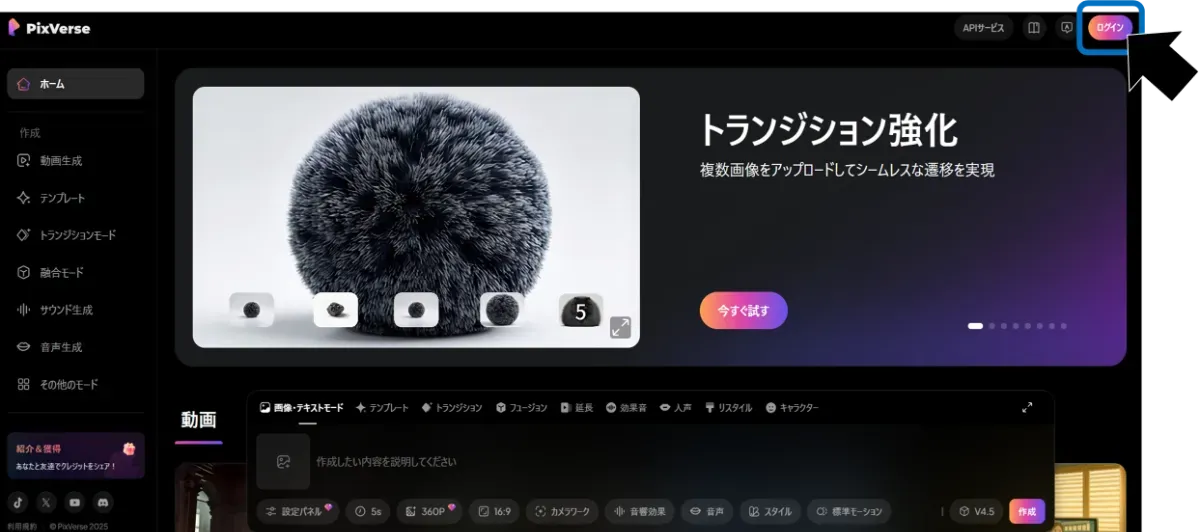
First, register for an account on the official website or app. Click “Login” in the upper right corner of the screen and select the account to use for login (Google, Apple, Discord, or any email address).
Video Generation
When you input text or photos, AI will generate a video in seconds.
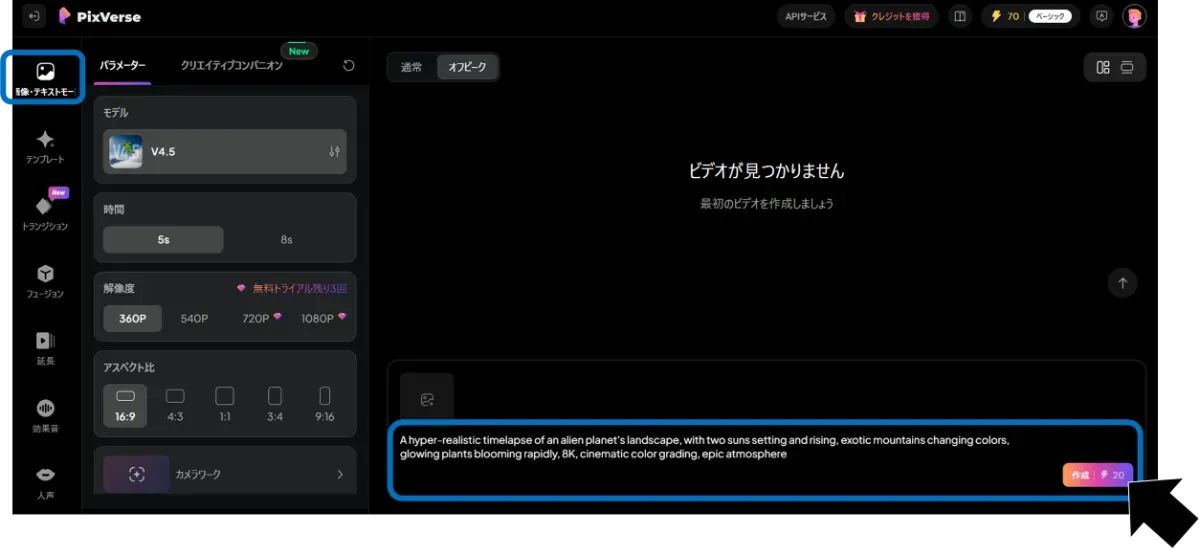
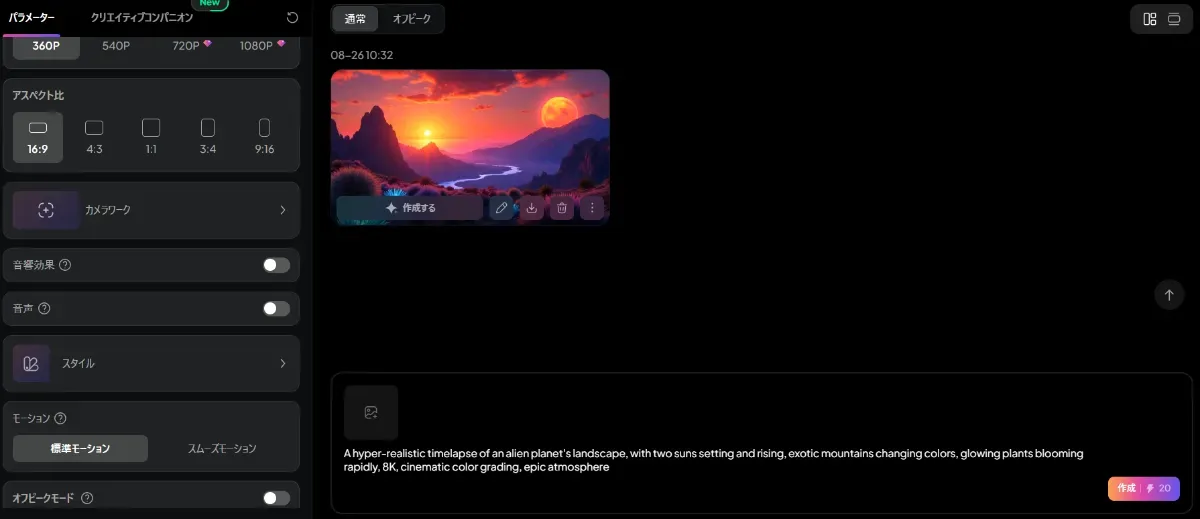
Results can be previewed before saving or sharing. Effects can be added as needed, and camera work and styles can be selected from multiple templates. Even beginners can easily generate high-quality videos.
Latest Examples from Official X Posts
Viewing attention-grabbing posts on social media is very effective for intuitively understanding a tool’s appeal. Here, we’ll explore PixVerse’s expressive power and ease of use through content posted by the official account in 2025 and beyond that received significant attention.
From illustration to animation—just one click!
Ad creation solved with AI in one prompt
Fuse up to 3 images into a style-matched video
These official posts succinctly demonstrate PixVerse’s “awesomeness”—achieving both “easy to use” and “attractive results”—enabling anyone to easily create “eye-catching” video content.
Implementation Considerations
While convenient, there are several points to note when using the service.
-
Free plan videos include a logo watermark
-
Commercial use is restricted by the official terms of service, so caution is required
-
Processing speed may vary depending on usage environment and congestion
When implementing for business use, it’s important to review the terms of service and rights before appropriate use.
Summary
PixVerse is gaining attention as an AI service that easily creates short-form videos from text or photos. With features such as diverse templates and effects, and high-speed generation, it has the potential to be effectively utilized for social media communication and promotion. The ability to try it for free is also attractive, and it’s worth considering implementation in situations where you want to strengthen video utilization.