
Video production often requires time-consuming and costly editing work, such as adding new shots, removing unwanted objects, or changing weather and time of day. Traditionally, this demanded reshoots or advanced VFX techniques, but Runway Aleph, announced by Runway, is a new AI model that automates advanced video editing through simple text instructions and image inputs.
This article explains Runway Aleph’s overview, main features, pricing structure, usage methods, use cases, and considerations to help you understand how it can benefit video production.
You may also want to read
What is Runway? Complete Guide to Gen-4 Features, Pricing & Use Cases
Table of Contents
- What is Runway Aleph
- What Runway Aleph Can Do
- Pricing Plans and Usage Requirements
- How to Use Runway Aleph
- Application Areas and Examples
- Usage Considerations
- Summary
What is Runway Aleph
Runway Aleph is the latest video generation AI model announced by Runway in July 2025. It utilizes existing videos as “context” and can transform and generate footage based on text instructions and reference images provided by users. This enables high-quality video production in a short time while eliminating the need for additional filming or complex editing work.
What Runway Aleph Can Do
Aleph’s strength lies not just in being a video generation AI, but in being a “versatile video model that transforms the production process itself.” As a multifunctional video editing AI, it possesses the following capabilities:
Adding and Removing Objects
Aleph recognizes elements within footage and can naturally add or remove objects according to instructions.
-
Addition For example, inputting “add a bus driving on the road” can add a realistic vehicle to existing footage. Shadows and reflections are generated to match the original environment, resulting in a seamless appearance.
-
Removal It’s also possible to remove unwanted pedestrians or vehicles that appear in street filming. This significantly reduces work time compared to traditional masking and manual compositing.
Runway Aleph can add objects and characters to scenes, seamlessly matching lighting conditions, color temperature and more. All you need to do is tell Aleph what you want. pic.twitter.com/ZO1C55FdPH
— Runway (@runwayml) August 15, 2025
This feature is particularly effective for finalizing advertising and event videos, making it easier to create video edits that “keep only the desired elements.”
Camera Perspectives and Scene Generation
Aleph understands input footage and can generate footage from different angles or continuations of scenes.
-
Different Angle Generation For example, the same scene can be represented from different perspectives such as “from the front” or “from above.” This eliminates the need for additional filming or preparing multiple cameras.
-
Scene Continuation Generation Instructing to “extend by another 10 seconds” at the end of a 5-second video generates new footage that naturally continues the story.
Runway released their new model, Aleph.
— Alex Patrascu (@maxescu) July 28, 2025
You can modify any video by just typing simple prompts.
For this clip, I asked to see the opposing angle of this film scene.
Mind-blowing! pic.twitter.com/SxNq3uuiZ9
This makes it a significant advantage to supplement filming shortfalls in movie and commercial production, allowing multiple cuts to be prepared quickly.
Style Conversion and Production Enhancement
The overall texture and atmosphere of footage can be freely changed.
-
Style Conversion Realistic footage can be converted to hand-drawn, anime-style, cinematic, and other styles.
-
Production Enhancement Day can be changed to night, clear weather to rain or snow, lighting to sunset, significantly enhancing production quality.
Runway Aleph can precisely control specific parts of a video, including manipulating ambient, atmospheric and directional light sources with accuracy. All you need to do is tell Aleph what you want. pic.twitter.com/fC5WHBLpco
— Runway (@runwayml) August 4, 2025
Work that previously depended on lighting equipment or VFX can be reproduced with a single text instruction, expanding the range of production possibilities. It can be widely applied from social media videos to film works.
Character and Object Replacement
Aleph has the capability to identify and transform characters and objects.
-
Character Editing It’s possible to make actors appear younger, older, or change aspects of their appearance. This can serve as an alternative to recasting or makeup corrections.
-
Object Replacement For example, instructing “change the bottle to a can” can naturally swap objects within the footage.
Change the age and appearance of actors with simple prompting.
— Runway (@runwayml) July 29, 2025
(6/7) pic.twitter.com/riGa9DL0fv
In advertising production, this is useful for product variation expression and promotional video modification, and is powerful when optimizing videos for multiple markets.
Background Removal and Compositing
Without using traditional chroma key filming (green screen), subjects and backgrounds can be automatically separated.
-
Background Replacement Actors or products can be placed in any background. Local scenery can be composited without traveling overseas for location shooting.
-
Multi-layer Compositing It’s also possible to combine people with multiple video materials to construct complex scenes.
Add a background green screen to any video.
— Jerrod Lew (@jerrod_lew) August 17, 2025
Combining the workflow of Weavy AI with Runway Aleph, you can take more control over your videos.
In this quick tutorial, I show you the process and prompts to cut a person's motion out of a video and repurpose. pic.twitter.com/FFeDbdbfzQ
This is particularly effective in TV programs, live streaming, and advertising videos where real-time performance or low-cost compositing is required.
In short, Runway Aleph’s strength lies in “covering diverse editing tasks with a single AI and significantly removing constraints in traditional video production.”
Pricing Plans and Usage Requirements
Using Runway Aleph requires a paid Runway plan subscription. Representative plans are as follows:
| Plan | Monthly Fee (Annual) | Monthly Credits | Estimated Aleph Usage Length |
|---|---|---|---|
| Standard | ~$12 | 625 credits | ~40 seconds |
| Pro | ~$28 | 2,250 credits | ~150 seconds |
| Unlimited | ~$76 | 2,250 credits + unlimited mode | Effectively long duration |
Aleph consumes 15 credits per second of video generation. The maximum length that can be generated is 5 seconds per clip (720p), but an upscaling feature to 4K is also provided.
How to Use Runway Aleph
Aleph can be used from Runway’s web application. The usage flow is simple.
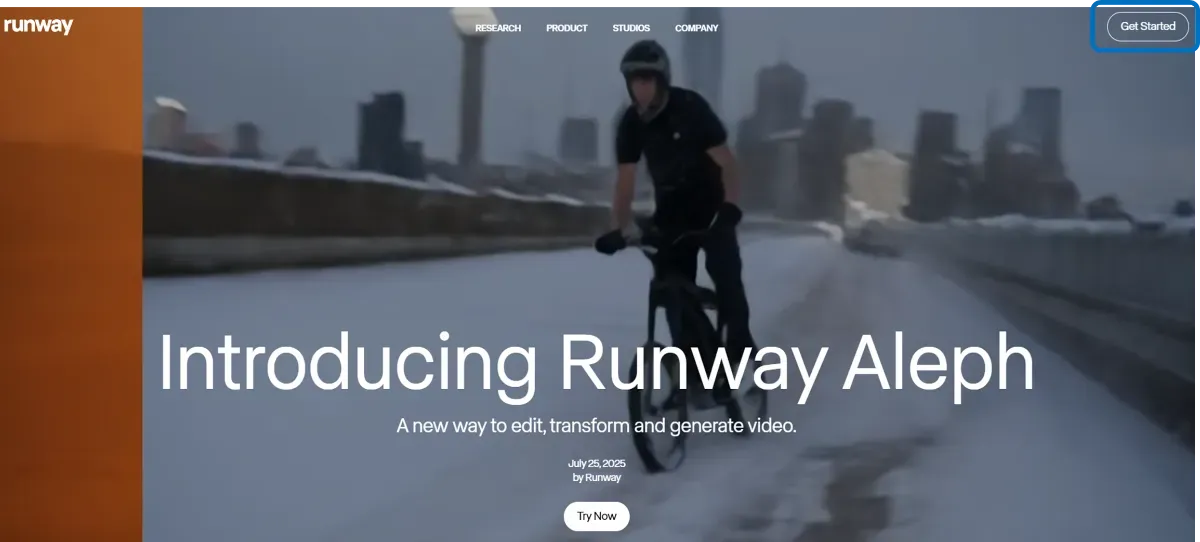
Account Registration
By registering your email address on the official website and clicking the link in the confirmation email, you can access the Runway dashboard. Upon initial login, 125 credits from the Free plan are granted.
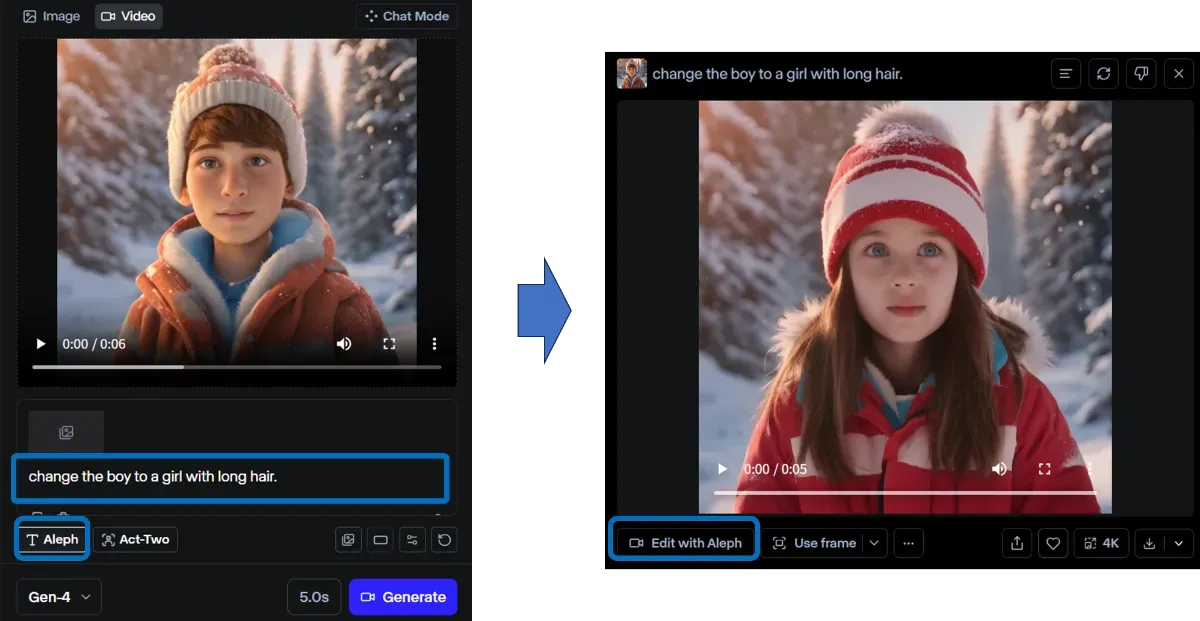
Aleph
Upload the video you want to edit. Then, simply input text instructions such as “change to snowy scenery” or “make the person younger,” and the AI will process it. Reference images can be added as needed. After reviewing the results, if further modifications are necessary, additional instructions can be sent via “Edit with Aleph” to complete the video step by step.
Application Areas and Examples
Aleph is being used across a wide range of fields.
-
Video Production Generate additional cuts for movies and weather effects with AI, reducing filming costs.
-
Advertising & Marketing Freely change backgrounds and props to quickly localize videos for diverse markets.
-
Post-production Streamline the removal of unwanted people or vehicles and background replacement.
-
Other Fields Music videos, architectural and real estate visualization, material generation for game development, and more.
Provision targeting video production sites such as film studios and advertising agencies is also anticipated, with high potential for future utilization in efficiency improvement and new creative expression.
Usage Considerations
While Aleph is powerful, there are currently some limitations.
The maximum generation time is 5 seconds, requiring segmented generation for longer videos.
Additionally, it cannot be used on the free plan, requiring a paid plan subscription. Furthermore, generated results may not match instructions exactly, so it’s effective to use it with the expectation of making several adjustments.
Summary
Runway Aleph is a next-generation AI model that enables video editing through text instructions alone. It significantly streamlines work that previously required specialized skills or high costs, such as adding and removing objects, style conversion, and background compositing. Despite the constraint of short clip generation, it can be applied across a wide range of settings from advertising production to film production. Aleph represents a compelling option for exploring video production efficiency and new methods of expression.