
In advertising, e-commerce, and social media operations, speed and consistency in image production, retouching iterations, and variation development frequently present challenges. ByteDance’s Seedream 4.0 integrates image generation and editing into a single model, providing workflows designed for 4K high-definition output, fast inference, multiple image references, and text-only editing. Priced at $0.03 per image with 200 free images to trial, it publicly provides use-case-specific implementation points and regional requirements.
This article organizes everything from Seedream 4.0’s mechanisms to pricing, usage methods, and real-world use cases, explaining the essential points to consider when evaluating implementation.
Table of Contents
- Overview of Seedream 4.0
- Key Features and Characteristics
- Unified Generation and Editing (Including Precise Text-Based Editing)
- Batch Input/Output and Multi-Reference (Consistent Series Generation)
- Style Conversion (Accelerating Tone and Manner Exploration)
- Knowledge-Driven Generation (Diagrams, Educational Materials, UI Mocks, and More)
- Control Using Visual Signals (Built-in Canny/Depth/Mask/Sketch, etc.)
- 4K Generation and Adaptive Aspect (Resolution and Composition Optimization)
- Related Tools and Pricing Structure
- How to Get Started
- Real-World Use Cases
- Pre-Implementation Verification Items
- Anticipated Risks and Countermeasures
- Summary
Overview of Seedream 4.0
Source: https://seed.bytedance.com/en/seedream4_0
Seedream 4.0 is an image generation model that integrates image generation and editing, flexibly handling tasks such as knowledge-based generation, complex reasoning, and reference consistency. Inference is faster than previous generations, and it can generate high-quality images at up to 4K resolution.
-
Unified architecture that achieves “generation and editing in one model.”
-
4K output and fast inference shorten production cycles.
-
Supports simultaneous processing of multiple images, style conversion, and knowledge-driven diagram generation.
These characteristics position Seedream 4.0 not just as an image generation tool, but as a comprehensive image production platform that includes editing and knowledge utilization.
Key Features and Characteristics
Seedream 4.0 integrates “generation” and “editing,” covering 4K output, reference image utilization, and series generation all within a single model. Below, we organize what it can do, where to use it, and key specification points by feature.
Unified Generation and Editing (Including Precise Text-Based Editing)
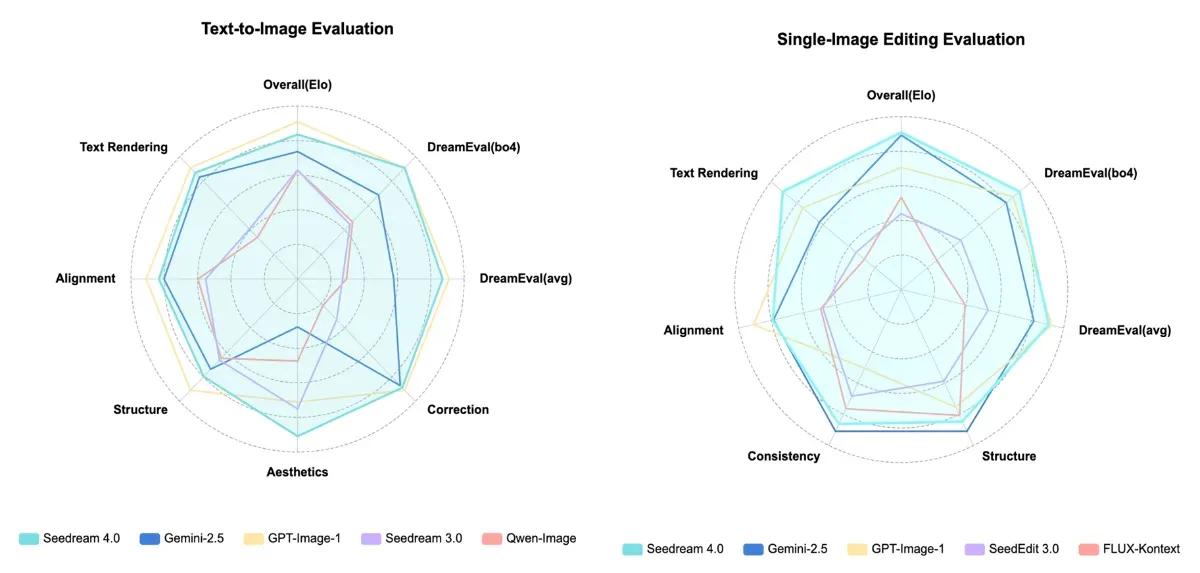
With a single instruction, you can remove unwanted objects, replace text within images, change lighting and atmosphere, replace subjects, and restore old photos. Because generation and editing are integrated within a single architecture, you can finish end-to-end without dividing workflows.
Source: https://seed.bytedance.com/en/seedream4_0
-
Text rendering and layout are enhanced, supporting creation and editing of layouts including diagrams, equations, and chemical structures (e.g., drawing equations and solution procedures on a blackboard, creating historical timelines, etc.).
-
The model itself learns generation and editing with the same design, aiming to balance both editing quality and generation quality in its official design.
[Public Demo Editing Examples]
Person removal, poster text date/title replacement, turning interior lights on, dog breed replacement, scratch restoration, etc.
This integration reduces the number of iterations between ideation → variation creation → final retouching.
Batch Input/Output and Multi-Reference (Consistent Series Generation)
You can provide multiple reference images simultaneously for batch series generation and output. This is suitable for production requiring consistency, such as product stories, brand VI, and storyboards.
-
Up to 10 reference images can be used simultaneously (e.g., combining person characteristics + style + layout).
-
Series generation is enabled by setting
sequential_image_generationin the API and controlling the number withmax_images. You can continuously generate morning/afternoon/evening or seasonal changes with the same theme and style. -
Supports streaming output, allowing sequential preview during generation for quality assessment.
-
The model supports batch generation (Text→multiple images / Image→multiple images / Multi-image→multiple images).
Beyond mass material production, this can accelerate review speed during the planning stage.
Style Conversion (Accelerating Tone and Manner Exploration)
Quickly switch between diverse styles like watercolor or cyberpunk, allowing parallel confirmation of multiple patterns.
-
Expand existing photos or generated images into multiple styles at once, quickly testing directional hypotheses.
-
Streamline daily tone and manner adjustments such as “person photo into styles A/B/C” or “same product into different media atmospheres.”
This makes it easier to iterate through directional hypothesis testing in minutes.
Knowledge-Driven Generation (Diagrams, Educational Materials, UI Mocks, and More)
Generate highly accurate explanatory diagrams and UI proposals from text. Effective for visuals requiring explanation such as documents, educational materials, and landing page wireframes. Strong text rendering supports generation with element organization and placement.
Create first drafts of explanatory diagrams and rough drafts in a short time.
Control Using Visual Signals (Built-in Canny/Depth/Mask/Sketch, etc.)
Visual signals such as contours, depth, masks, and hand-drawn guides—which conventionally required additional models (e.g., ControlNet)—are natively integrated.
-
Suitable for strongly shape-constrained applications such as interior generation from floor plans, pose control, and UI structure prototyping.
-
Bridges design → visuals such as “2D draft → 3D render style” or “sketch → real-world imagery.”
Generate while maintaining structural requirements such as layout and posture.
4K Generation and Adaptive Aspect (Resolution and Composition Optimization)
Supports up to 4K high-definition output, with mention of a mechanism to automatically adjust aspect ratio (vertical/horizontal ratio) according to content.
-
API’s
sizeparameter allows “2K” specification or explicit pixel dimensions (e.g., 2048×2048). -
Model flexibly handles media-specific size requirements (posters, vertical social media, e-commerce thumbnails, etc.).
Makes it easier to simultaneously satisfy “resolution,” “composition,” and “media requirements.”
Related Tools and Pricing Structure
Implementation routes and pricing are easier to understand when organized first by “where to use it (console/API).”
| Category | Details |
|---|---|
| Delivery Channel | Provided through BytePlus ModelArk (console/API). Can be quickly tested in the playground and implemented in production via API. |
| Pricing | $0.03/image pay-as-you-go. 200 free images available (same unit price for Text-to-Image / Image Editing). |
| Representative Features | 4K generation, up to 10 multi-references, batch input/output, style conversion, series generation (story-driven). |
| References | Product page “Start for free,” “Get API,” playground introduction, API documentation. |
First try with the free tier, then expand to production use via API integration according to needs.
How to Get Started
First, register with BytePlus ModelArk and enable Seedream 4.0 from “Start for free.” Open the Playground on the left side of the console, select the model, and enter prompts to confirm generation and editing behavior in your browser.

For full-scale implementation, obtain an API key from the console and call the Image Generation API (Seedream 4.0 API). Requests can specify text as well as reference image URLs and editing instructions. During operation, use endpoint management and monitoring functions to ensure stable operation and cost visibility.
For those who want to try Seedream 4.0 before full API implementation, using external services like Fal.ai is also an option worth considering.
Real-World Use Cases
Here we introduce actual Seedream use cases posted on X (formerly Twitter).
-
10 practical examples covering generation, editing, style conversion, and batch output with text input alone
-
Create high-quality editorial-style photos from a single sentence without studio or model
-
Instantly switch existing photos to any style and test diverse tones and manners
All these posts demonstrate achieving advanced editing and consistent series generation with text instructions alone, concretely showing speed and expressiveness previously unthinkable in traditional image production.
Pre-Implementation Verification Items
Pre-confirmation of official information from operational and compliance perspectives is effective.
-
International Provision Conditions Seedream 4.0 is prohibited for use within the EU region. For operations in target regions, alternative measures or operational structure reviews are necessary.
-
Data Location and Processing ModelArk’s computing resources are located in Johor, Malaysia / Jakarta, Indonesia. Customer data is clearly stated as not provided to third parties or used for training, with encryption options and mutual trust computing capabilities also provided.
-
Content Management Regarding generated content, options such as pre-filters and retention opt-out are provided, allowing adjustments according to usage environment.
Based on the above, implementation design aligned with target regions, data policies, and internal rules is important.
Anticipated Risks and Countermeasures
Precisely because of its high functionality, consideration of the following practical risks is necessary.
-
Rights Clearance Always obtain rights holder permission for logos, celebrity portraits, designs, etc., or operate according to each platform’s terms.
-
Authenticity Assurance Because realistic images can be easily generated, clear indication that they are composites and review systems are essential.
-
Handling Sensitive Information Thoroughly manage to avoid including personal information or confidential data in input prompts or reference images.
By appropriately managing these aspects, you can balance operational efficiency with reliability assurance.
Summary
Seedream 4.0 is a practical image generation AI that covers generation + editing integration, 4K output, up to 10 reference inputs, prompt editing, and knowledge-driven diagrams in one model. Implementation begins with BytePlus ModelArk at a simple pricing of $0.03/image with 200 free images, allowing smooth transition from trial to production use. Before implementation, confirm international provision conditions (EU region prohibition), data handling, and content filter policies, then build a smooth transition flow of understanding behavior in Playground → business integration via API according to production workflows.