
As the need to easily create in-house BGM and jingles for business use increases, the AI music generation platform SUNO is gaining attention as a solution.
This article provides a concise overview of SUNO’s features, usage in business scenarios, pricing structure, copyright considerations, and implementation procedures.
You may also want to read
Suno v5 vs v4.5: What Changed And How To Use It Safely
Table of Contents
- What is SUNO?
- Key Features
- SUNO Music Samples Posted on X
- Use Cases and Business Applications
- Pricing and Licensing Structure
- Getting Started Guide
- Tips for Efficient Use
- July 2025 Update: 3 New Creative Features Expanding v4.5+
- Summary
What is SUNO?
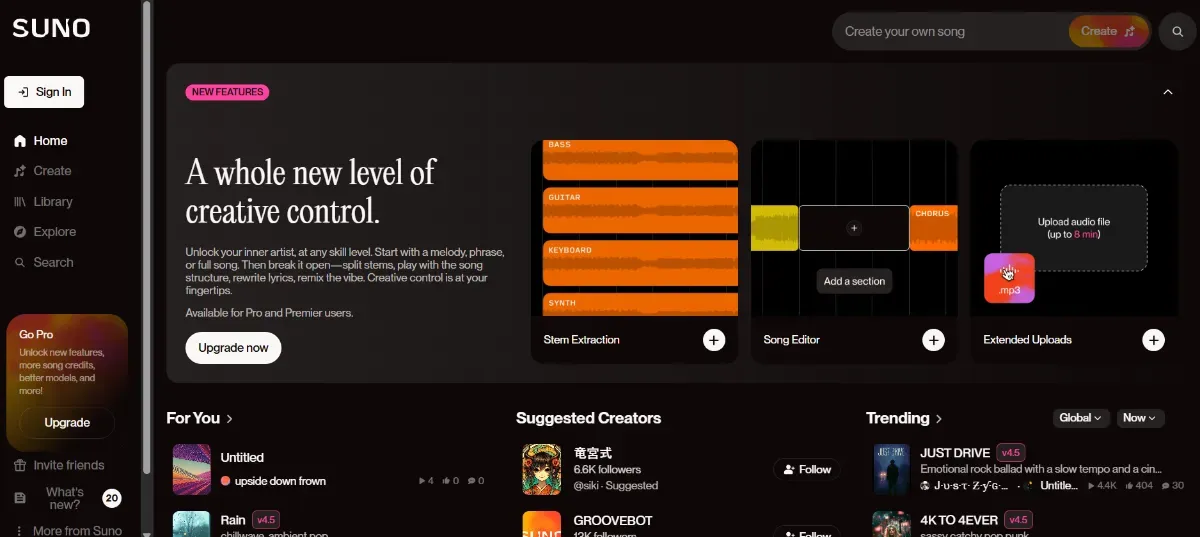
SUNO is an AI music platform that can automatically generate full-length songs with lyrics in as little as 30 seconds using only text instructions. It supports Japanese and can create various genres including J-POP style songs and traditional music styles.
The basic features are available for free, allowing you to generate up to 10 songs per day. The usage environment is flexible, with access available through web browsers, smartphone apps, and integration with Microsoft Copilot.
Source: https://suno.com/
Key Features
SUNO offers a variety of features suitable for business use. These distinctive features can significantly streamline the music creation process.
-
Music Generation via Text Input Example: Simply enter “bright and energetic pop song” to automatically generate a 2-minute vocal track.
-
Custom Lyrics Feature Create original songs incorporating product names and messages.
-
BGM Switching Feature Switch to a vocal-free version with one click, making it easy to adjust compatibility with narration audio.
-
Reconstruction of Existing Audio Generate songs in different styles from humming or existing audio sources.
-
Stem Separation Download Output vocals, drums, bass, etc. separately to streamline video editing and mixing work.
-
Copilot Integration Integrate with Microsoft Copilot for instant generation with instructions like “create a 30-second product introduction jingle.”
SUNO Music Samples Posted on X
Below are SUNO song examples selected from official and user posts on X (formerly Twitter).
All were generated with just a few lines of prompts or humming audio, demonstrating SUNO’s ability to cover diverse genres.
-
R&B Song Generated from Humming Generation style: Humming input → Automatic generation with R&B arrangement Highlights: Smooth vocals and beats elevate improvised melodies into professional tracks.
Make a song from any sound. Coming soon 🎧
— Suno (@SunoMusic) June 3, 2024
VOL-3: Humming a tune, but give it an R&B vibe
Sung by Rebecca (Suno Product Manager) pic.twitter.com/nJQIgOnGZd -
Original Song from Lyrics and Imagery Generation style: User-written lyrics + image specification → Grunge-style rock Highlights: Heavy sound and emotional vocals reminiscent of rainy Seattle.
We have to brag: Our community makes some incredible music. This song is "Seattle Rain" by @sherideestudios. pic.twitter.com/pPcjOdPzxU
— Suno (@SunoMusic) March 16, 2024
As these samples demonstrate, SUNO can incredibly easily create diverse, high-quality music regardless of genre or tone.
Use Cases and Business Applications
SUNO can be practically utilized in various business scenarios. Representative uses include:
-
Video Content Creation Set theme songs for each post to create impressive presentations that remain in viewers’ memories.
-
Advertising and Campaign Initiatives Create multiple jingles in a short time and select effective appeal sounds through A/B testing.
-
Podcasts and Webinars Use as jingles for program openings or section transitions to improve brand consistency.
-
Internal Events and Training Videos Contribute to memorable presentations and creating unity with songs featuring company names and slogans.
-
Music Stock Sales Register in-house produced audio sources on stock sites for secondary monetization.
Pricing and Licensing Structure
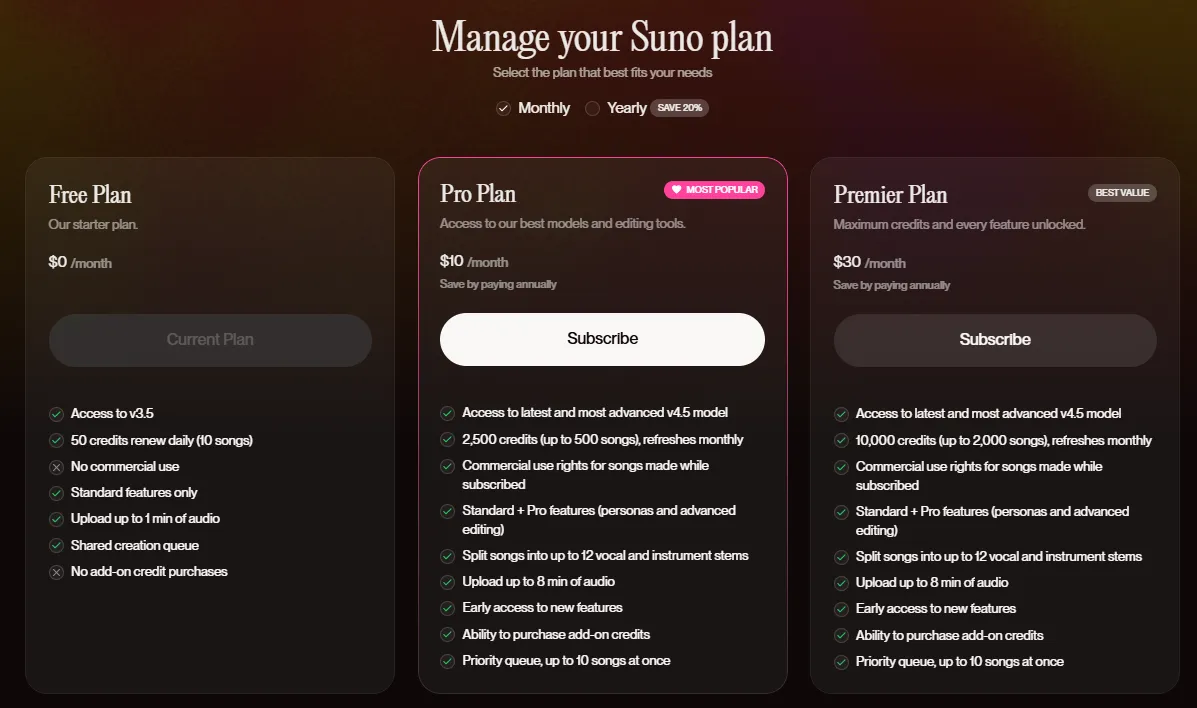
SUNO is divided into two usage forms: free and paid.
Basic (Free)
Generate up to 10 songs per day. Listening and sharing are possible, but commercial use is not allowed.
Pro (Approximately $10/month)
Generate up to 500 songs per month. Supports commercial use, and users retain licenses for generated content.
Premier (Approximately $30/month)
Generate up to 2000 songs per month. Suitable for large-scale production and distribution, with the same license conditions as Pro.
 Source: https://suno.com/account
Commercial Use Supplement
Songs created with paid plans can be used for any commercial purpose, including YouTube, SNS, advertising, and store BGM. The license remains valid even after contract termination.
Copyright Considerations
While copyright belongs to the user, the legal treatment of AI-generated works may vary by country and time period, so verification is recommended as needed.
Getting Started Guide
SUNO can be easily started by anyone with the following steps.
Register from the SUNO website or app using a Google account, etc.
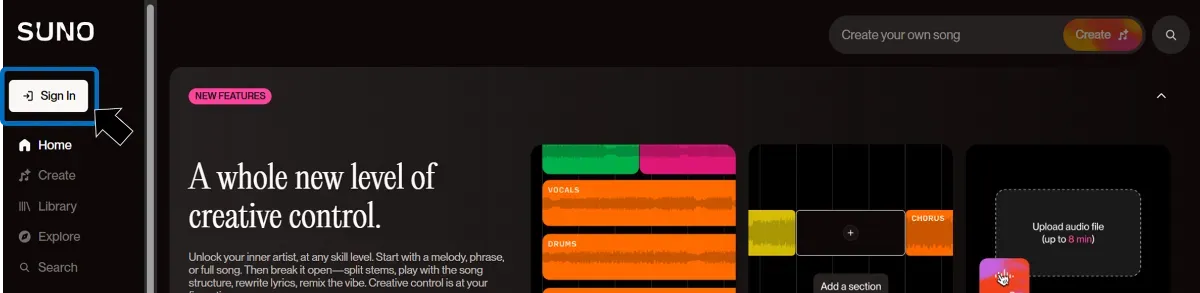
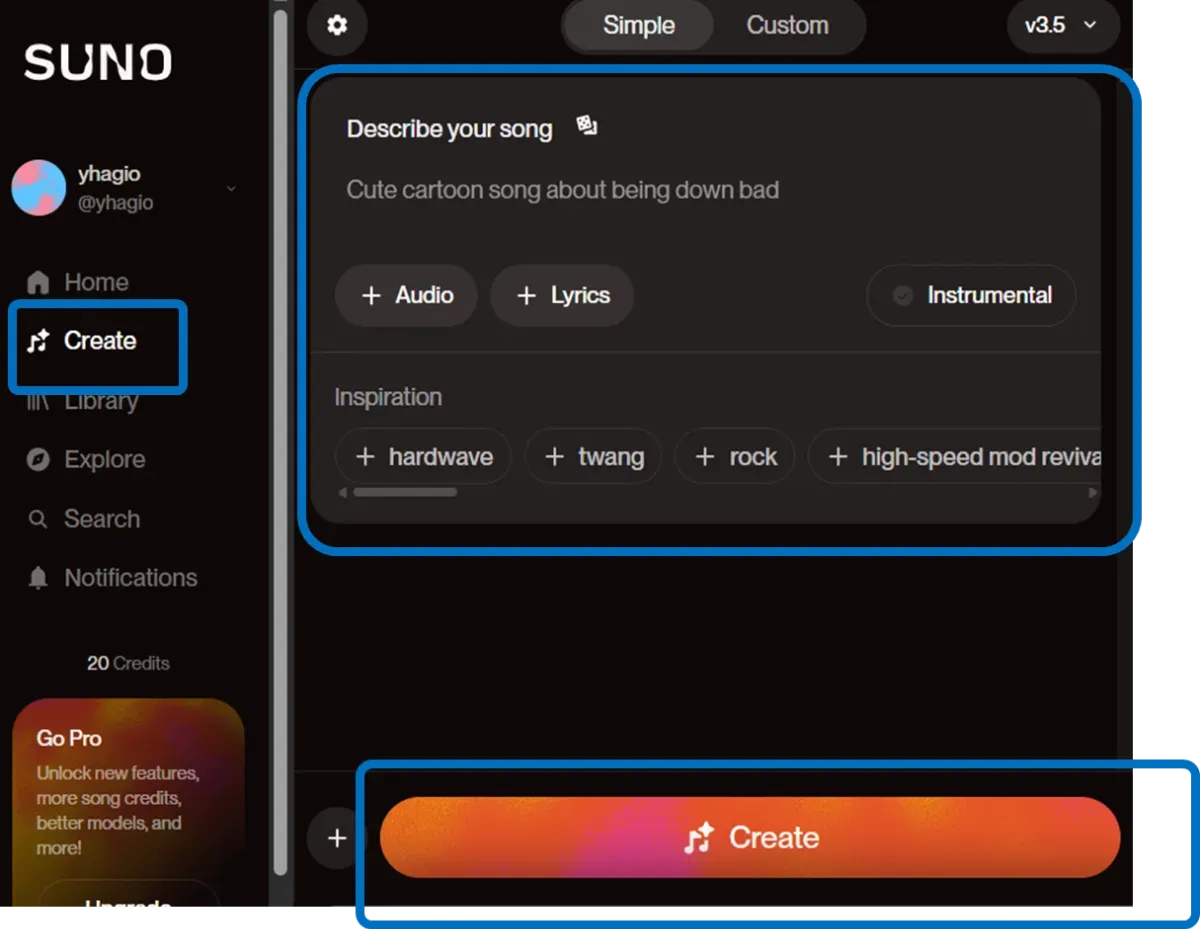
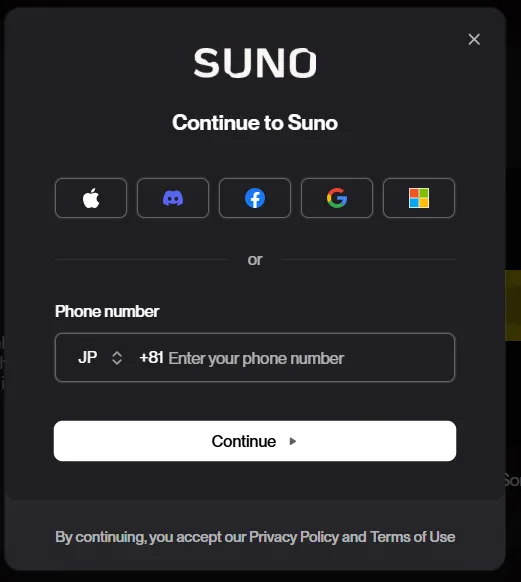 After logging in, click the “Create” menu. Enter the image of the music you want to generate in the input area. If you want to specify detailed settings such as lyrics, tempo, and key, use Custom mode. After entering, click “Create.”
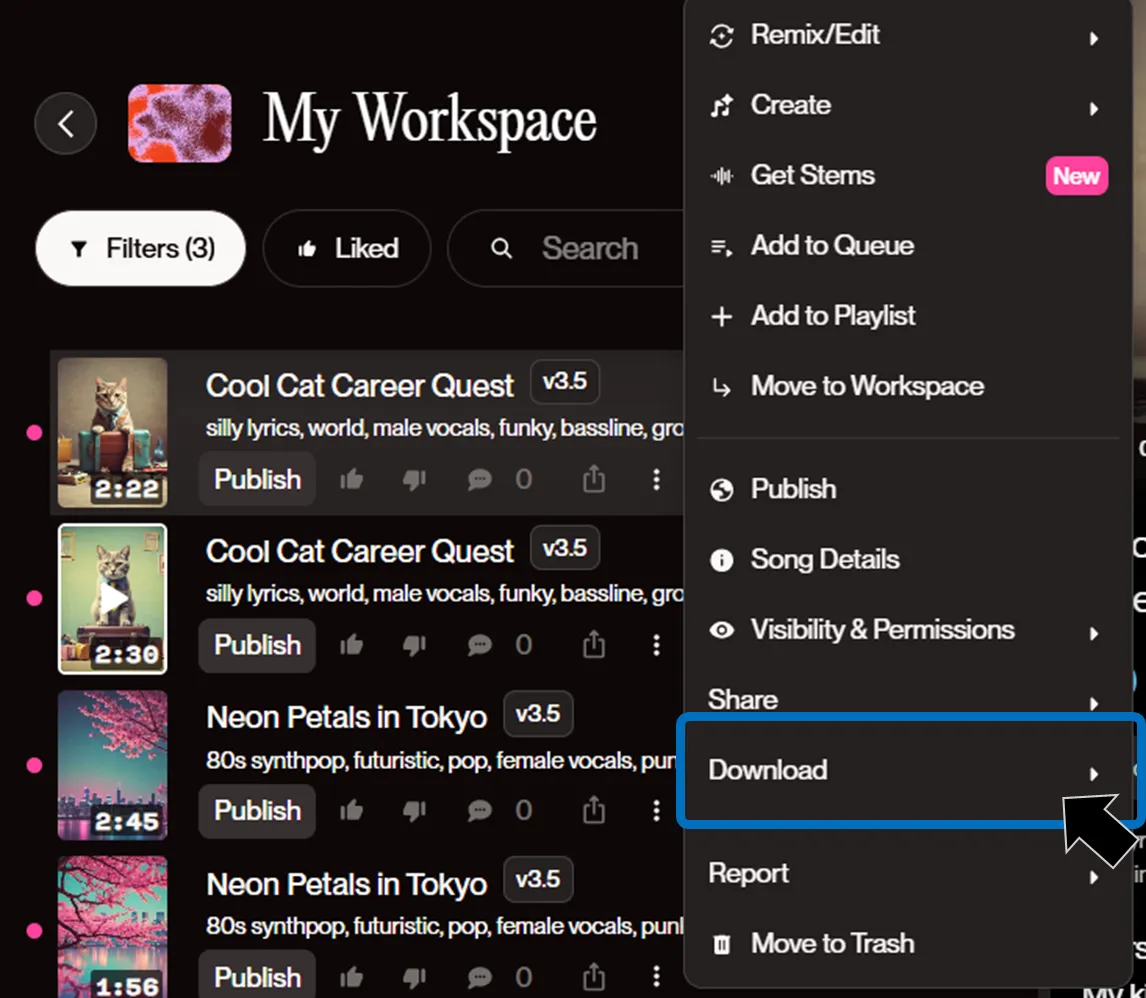
 Play to confirm the content and download as MP3 or share via link.
 Even first-time users can operate intuitively, allowing you to enjoy music creation from the moment inspiration strikes.
Tips for Efficient Use
Here are practical tips for maximizing SUNO’s performance.
-
Keep Genre and Instrument Specifications Simple Limiting to 2 elements like “EDM × Japanese instruments” tends to produce more stable generation.
-
Emphasizing Specific Instruments Writing instrument names in square brackets like
[sax]makes it easier to reflect desired tones. -
Utilizing the Remaster Feature Refresh old version songs with the latest sound quality.
-
Vocal Reuse with Persona Registration Save preferred voice qualities for continuous use.
-
Editing Extension with Stems Separation Separated part exports make DAW editing and mixing work easier.
By incorporating these innovations, you can achieve more personalized music expression beyond simple automatic generation.
【July 2025 Update】3 New Creative Features Expanding v4.5+
In mid-July 2025, SUNO released the latest model “v4.5+”. The catchphrase is “Swap vocals, flip instrumentals, or spark a song from any playlist — it’s creativity, upgraded.” Based on the previous v4.5, three new features have been added.
v4.5+ enables richer vocal expression and complex harmonies, continues to support song generation up to 8 minutes long, and significantly improves prompt interpretation accuracy for genre mixing and mood specification.
Vocal swapping, instrumental flipping, and other more intuitive and flexible creation capabilities have become possible, opening new horizons for music generation with SUNO.
*As a beta version, currently only available to Pro/Premier users.
| New Feature | What It Does | Main Uses |
|---|---|---|
| Add Vocals | Automatically synthesizes and overlays AI vocals based on entered lyrics onto existing accompaniment (self-made/SUNO-generated/stemmed tracks) | Top-line verification for composers/producers, scratch vocal creation |
| Add Instrumentals | Upload vocal tracks or humming, and AI composes and arranges full accompaniment matching that melody | Demo creation for singer-songwriters, song creation from a cappella material |
| Inspire | Specify a playlist composed only of your own created songs with the “+Inspo” button, learn that atmosphere, and generate new songs | Tone unification of in-house BGM, maintaining world view of series videos |
Add Vocals
A feature that allows adding AI vocals to arbitrary instrumental sources afterward.
-
Open the ”…” menu for the target song in Library or Workspace
-
Select Add Vocals
-
Enter lyrics and Create
-
Adjust the blend of vocals and accompaniment with the Audio Strength slider as needed
SUNO V4.5+のAdd Vocals(ボーカル追加)機能を使って、ボーカルの無いインスト曲に歌詞を入力して歌わせてみました
— こば@AIBridge Lab (@doerstokyo342) July 21, 2025
動画の曲を聞いていただくと原曲をほぼ変えずにボーカルが足されていることが分かると思います👇 #SunoAI #AIMusic pic.twitter.com/qAB35BOw9u
Add Instrumentals
A reverse-approach generation feature that automatically adds accompaniment from audio material.
-
Upload your voice, humming, dialogue, etc. within 8 minutes
-
Specify Instrumental on the generation screen and enter the style, then AI creates full arrangements
-
Workflows like thinking of TikTok or Podcast jingles with “voice only” → adding accompaniment with SUNO become possible.
Suno v4.5+のテスト。楽曲はいつも検証用で使っているものです。
— AYAME (@aym2m) July 19, 2025
Add Insturumentalでプロンプトはシンプルに「オーケストラ」です。左が追加されたもの。右が4.5+で原曲をカバーしなおしたもの。なかなか楽曲理解度が高そう。
※この機能はアップロードしなおしたものじゃないと使えないのです https://t.co/4htPMiN58U pic.twitter.com/aBywYD3Ybv
Inspire
A mode that can generate new songs while learning and preserving your song taste and “character.”
-
Press the + Inspo button in Create > Custom and select a playlist of about 3-5 songs
-
SUNO extracts tempo and chord sense, proposing new songs matched to user-specified lyrics and style
-
Convenient when you want to maintain the “same brand feel” for series videos, in-game BGM, store loop sounds, etc.
SUNO V4.5+試しました♪
— 右よし左よし秋よし@AIエンタメ (@akiyoshisan) July 18, 2025
新機能の「Inspire(Inspo ボタン)」で自分が過去に Suno… https://t.co/dNt0jMzTjm pic.twitter.com/eb6Ud1sATD
Summary
SUNO is a powerful tool that reduces the time and cost of music creation while enhancing expressiveness and impression formation in business. The implementation flow is as follows:
- First Try the Free Plan Confirm the speed and quality of song generation.
- Switch to Pro Plan as Needed Obtain commercial licenses and create audio sources that can be externally deployed.
- Expand Usage in Daily Business Actively incorporate into videos, SNS, advertising, events, etc.
The informational value of sound will continue to increase. Why not start using SUNO to create communications that remain impressive not only visually but also through “hearing”?