
AI music tools keep evolving, and Suno’s v5 release is the biggest jump yet—better audio fidelity, more lifelike vocals, and tighter creative control. At the same time, rights and pricing remain very deliberate, so teams need a clear view before moving pilots into production.
This English guide mirrors the Japanese original: We compare v5 vs v4.5, unpack the commercial terms, and highlight fresh community demos so you can hear the differences yourself.
Table of Contents
Key Differences Between v4.5 and v5
Suno’s official launch copy for v5 promised “immersive audio, authentic vocals, and unparalleled creative control.” The rollout landed on 23 Sep 2025 for Pro and Premier subscribers.
By contrast, v4.5 (May 2025) emphasized extended length (up to eight minutes) and better prompt/genre adherence. The table below summarizes what changed.
| Angle | v4.5 (May 2025) | v5 (Sep 2025) |
|---|---|---|
| Initial clip length | Extended to 8 minutes | Length not highlighted; focus is audio fidelity & control |
| Audio quality | Cleaner mixes, less noise | “Immersive audio” with better imaging and punch |
| Vocal expression | Broader emotion range, higher resolution | “Authentic vocals” with greater naturalness |
| Style/genre handling | Better prompt obedience & mashups | Builds on v4.5 but raises sonic realism |
| Creative control | Song Editor + Extend available as separate tools | Emphasizes combined control with Song Editor + Stem Extraction |
| Availability | Pro / Premier | Pro / Premier only |
Song Editor (rewrite lyrics, regenerate segments, tweak transitions) and Stem Extraction (split vocals/ accompaniment up to 12 tracks) underpin v5’s control story—allowing “generate + edit” workflows without leaving the platform.
Pricing & Rights Prerequisites
Commercial usage hinges on the paid tiers. Suno currently offers Basic, Pro, and Premier:
- v5 is limited to Pro and Premier. Basic users stay on legacy models and cannot commercialize their tracks.
- Only songs generated while a paid plan is active receive commercial rights; Suno does not retroactively upgrade past content.
- Each plan carries daily or monthly credit caps (Basic = low/day-based, Pro = medium/monthly, Premier = high). Plan your Song Editor retries and Stem exports accordingly.
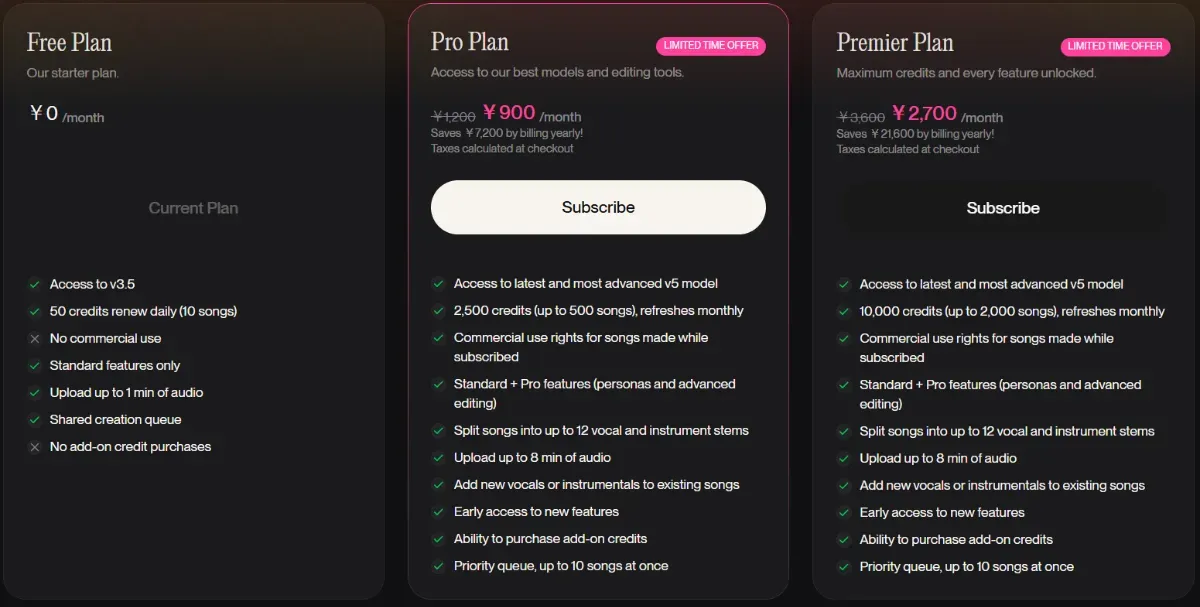
Source:https://suno.com/account
A practical playbook:
- Ideate in Basic, then move promising prompts to Pro/Premier for final renders and rights.
- Track credit burn when iterating with Song Editor to avoid hitting limits late in the cycle.
- Design a DAW pipeline (Song Editor → Stem Extraction → external mix) so revisions stay fast even when stakeholders request changes.
Fresh Community Examples
Here are three posts from the week of the v5 launch that illustrate how creators are using it.
-
Pairing AI music with AI video
A Suno v5 song synced with Kling 2.5 video shows how marketing teams can prototype full audiovisual spots in one pass.
-
Prompt regression testing for audio fidelity
Running the same prompts on v5 demonstrates how much clarity and mix depth improved. Sharing the public Suno profile makes internal review and client demos easier.
-
Instant song creation + link sharing
Creators can send a single link so stakeholders can listen immediately, collect feedback, and decide whether to invest in further production.
Wrap-Up
v4.5 expanded duration and genre flexibility, while v5 layers in sonic realism, vocal naturalness, and integrated control. Commercial deployments require Pro or Premier, and the most resilient workflow uses Song Editor → Stem Extraction → external DAW so revisions stay cheap. Start with small KPI experiments (watch time, CVR, stream completion). If metrics improve, standardize prompt templates and credit budgeting to keep scale predictable.
You may also want to read