
Short-form production normally juggles shooting, editing, and motion graphics—costly and slow. Early video models helped but often lacked expressive faces or dynamic camera work.
Vidu Q2 (Sept 2025) pushes past those limits with micro-expressions, push–pull camera language, faster renders, and tighter prompt obedience.
This English digest covers the upgrades, generation modes, pricing, workflow, and use cases so you can judge if Q2 fits your pipeline.
Table of Contents
Overview
Built by ShengShu Technology (生数科技), Q2 supports text→video and image→video and focuses on four dimensions: acting, cinematography, speed, and semantic control.
- Reconstructs micro expressions—flickers around the mouth, brief hesitation, furrowed brows—so characters feel alive.
- Push–pull zooms and camera choreography let shots breathe like real cinematography.
- Two modes (Flash/Cinematic) produce 2–8 second clips optimized for speed or quality.
These are positioned as aiming to generate videos that “look as if they were performed by real people,” for use in advertising, short-form dramas, and video production.
Main Improvements and Benefits
Acting fidelity
Micro expressions (glances, brow furrows, subtle smiles) survive the generation pipeline.
- Official notes call it “human-level realism,” which basically means no more mannequin faces.
- Even 2–8 second shots carry enough emotional signal to sell a product or convey story beats.
Use this when you need a convincing reaction shot—product reveals, testimonials, character-driven social content.
Cinematic Camera Work
Camera work as a visual language is enhanced, including seamless “push–pull” movements that transition back and forth between wide and close shots of the subject.
Officially, it is explained that the push-pull camera technique enables natural transitions from panoramic views to close-ups, making storytelling through “visual language” possible. It is also stated that users can choose everything from low-motion shots to highly dynamic shots.
Rather than being a simple zoom effect, this increases the freedom of shot design, making it easier to control what is shown within a given runtime.
By enabling storytelling through forward and backward camera movement, it is particularly well suited to designing highlight moments for products or characters.
Two Generation Modes (Flash / Cinematic)
Even with the same prompt, the output characteristics differ depending on the mode. A practical workflow is to iterate quickly in Flash mode first, then finalize the definitive version in Cinematic mode.
| Comparison Axis | Flash (Speed-Focused) | Cinematic (Quality-Focused) |
|---|---|---|
| Estimated generation time | Approx. 20 seconds for a 5-second 1080p clip (reference) | Longer processing time (detail and texture prioritized) |
| Clip length | 2–8 seconds | 2–8 seconds |
| Intended use | Idea validation / rapid mass prototyping | Final output / direction-driven production |
| Typical shot style | Responsiveness and motion priority | Emphasis on expressions, lighting, and texture |
Choosing the mode based on delivery timelines and quality requirements is an effective approach. A two-stage workflow—using Flash for experimentation and Cinematic for production—allows for a smooth and realistic process.
Variable Duration and Resolution
Clip duration supports 2–8 seconds, making it well suited to short-form format variations such as top-board assets, large-scale variant production, and cut replacements for short videos.
From an operational standpoint, it fits well with A/B testing and variant generation using templated prompts and fixed durations.
Input Formats and Consistency Control
While not a standalone new feature of Q2, the platform offers a wide range of input methods and built-in mechanisms to maintain visual consistency.
-
Text to Video: Generate video using text prompts alone.
-
Image to Video: Generate from a still image. Intermediate frames are interpolated using First/Last Frame control.
-
Reference to Video: Maintain character and visual consistency using 1–7 reference images.
Key design considerations include preparing reference images (front view, side view, costume) and combining them with First/Last Frame control to reduce character drift and discontinuity between shots.
Development Integration and Production Workflow
APIs are provided for integration into production pipelines.
-
Standardizing prompts, reference images, and parameters improves reproducibility.
-
Workflow-aligned automation shortens lead time from prototyping to finalization.
For team-based operations, it is effective to define presets and manage them alongside review criteria.
Overall, these features are designed to compress the production cycle while maintaining a high density of information—approaching the level of human performance—even within very short clips.
How to Choose a Generation Mode
Because the “character” of the output changes depending on the generation mode—even with the same prompt—understanding how to choose between them leads to more stable and predictable workflows.
| Comparison Axis | Flash (Speed-Focused) | Cinematic (Quality-Focused) |
|---|---|---|
| Estimated generation time | Approx. 20 seconds for a 5-second 1080p clip (reference) | Requires more time (high fidelity and texture-focused) |
| Clip length | 2–8 seconds | 2–8 seconds |
| Primary purpose | Iterative testing / rapid SNS-ready output | Emphasis on detail, texture, and direction |
| Expressive characteristics | Fast motion response, quick iteration from draft to revision | Richness in facial expression, highlights, and material texture |
Starting in Flash mode to lock in composition and motion direction, then refining textures and visual quality in Cinematic mode, helps accelerate decision-making.
Specifications and Technical Characteristics
Understanding these specifications makes it easier to integrate the system into internal workflows and to evaluate delivery and distribution requirements.
-
Input: Text to Video / Image to Video / Reference to Video (up to 7 reference images).
-
Duration: 2–8 seconds.
-
Resolution: As an official Flash example, 1080p (5 seconds) can be generated in approximately 20 seconds (Cinematic prioritizes higher fidelity and requires longer processing time).
-
Prompt understanding: Enhanced semantic adherence to prompts.
-
API: Provided via the Vidu API Platform (for development and system integration).
Pricing and Related Tools
Pricing is based on a credit-based subscription model, with details available on the official Pricing page. In addition, the official Vidu blog provides reference figures for each plan, including the monthly cost equivalent of annual billing, the number of credits, and the number of generations included.
| Plan | Monthly Price (annual billing equivalent)* | Credits / month | Estimated number of generations |
|---|---|---|---|
| Free | $0 | Bonus credits | – |
| Standard | $8 | 800 | 200 |
| Premium | $28 | 4,000 | 1,000 |
| Ultimate | $79 | 8,000 | 2,000 |
- Reference figures taken from the official Vidu blog (monthly equivalent based on annual billing).
Please be sure to check the official Pricing page for the latest plans and terms.
Workflow from Setup to Output
Create an account via the Create section on the official website, then select Vidu Q2 from the dashboard. Open either Text, Image, or Reference, enter your prompt (Japanese is supported), specify the duration and resolution, and run the generation.
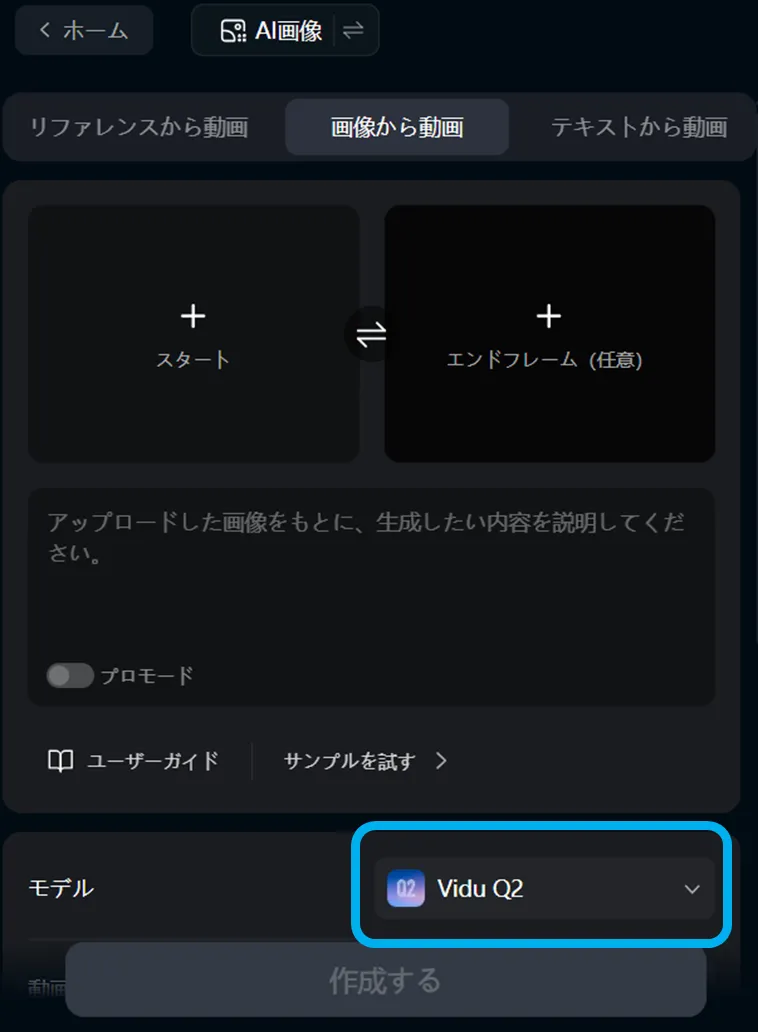
After generation, review the result in the preview, then either download it as is or refine it through regeneration.
Use Case Ideas
According to publicly available information, the platform is intended for use across the internet, advertising, video production, media, education, and gaming. It is well suited to short-form ad creatives, short dramas, product showcases, and in-game cutscene production. With enhanced micro-expressions and camera work, it is particularly effective for videos where people are meant to appear as if they are truly “performing.”
-
Large-scale generation of campaign video variations
(Swap text → iterate in Flash → finalize in Cinematic) -
Serialized short-form content with consistent characters
(Leveraging Reference to Video) -
Rapid variant deployment of “attention-grabbing” visuals for exhibitions or in-store displays
(Creating variations within the 2–8 second range)
These use cases are well suited to workflows that accelerate the transition from advertising creative testing to final production.
Summary
Vidu Q2 is a model designed to deliver persuasive short-form video by strengthening performance-like expression and cinematic camera work. By strategically switching between its two generation modes, it achieves both rapid iteration for validation and high-quality final output.
A recommended approach is to prepare presets that combine fixed durations with reference images, use Flash mode to establish direction, and finalize the result in Cinematic mode. As pricing and specifications may change, be sure to confirm final decisions using official primary sources and introduce the system in alignment with your organization’s governance policies.