
Short-form video keeps getting harder to ship—the same team now handles shooting, editing, motion graphics, and approvals. Wan 2.5, Alibaba Cloud’s latest Model Studio release, tackles that bottleneck by generating 5–10 second clips at up to 1080p/24fps while staying in sync with narration or imported audio. Because it ships via both API and the wan.video UI, you can slot it into existing VFX or marketing workflows without a rewrite.
This guide recreates the Japanese source article so you can scan Wan 2.5’s roadmap, specs, pricing, usage paths, and operational guardrails.
Table of Contents
- Wan 2.5 Update Highlights
- Core Capabilities and Strengths
- Specs by Generation
- Pricing and Packaging
- Fastest Way to Start (API + Web)
- Business Use Cases
- Implementation Checkpoints
- Takeaways
Wan 2.5 Update Highlights
Source: Alibaba Cloud official X
Wan 2.5 is the preview build of Alibaba Cloud’s Model Studio video generator. Versus Wan 2.2/2.1 it expands clip length and resolution, adds native audio generation, and tightens prompt interpretation.
In short, Wan now finishes audio and visuals simultaneously so you can output production-ready short shots in one render.
- Up to 10-second clips at 1080p, 24fps
- Optional auto narration or lip-synced uploads
- Camera motion, composition, and framing handled in one pass
Core Capabilities and Strengths
Below is a capability-by-capability rundown. The big ideas are flexible duration + resolution, synchronized sound, better prompt compliance, and subject consistency.
Text/Image-to-Video Generation
Choose 5-second or 10-second clips and render at 480p, 720p, or 1080p. Both text-to-video and image-to-video modes export MP4 (H.264) at 24fps.
Together those settings make it easier to wrap a full message into a short intro, hero shot, or product explainer.
- Duration presets: 5s or 10s
- Resolution presets: 480p / 720p / 1080p
- Format: MP4 (H.264), 24fps
The net effect: more expressive, self-contained short videos without resorting to extra edits.
Audio and Video in One Pass
Wan 2.5 handles synchronized audio end-to-end. It can auto-generate narration or align to an MP3/WAV you host.
That removes a whole pass of temp VO creation and manual compositing.
- one-shot renders with auto narration
- supply an audio URL for lip sync
- audio also works in image-to-video mode
Bottom line: one pipeline handles both eyes and ears, accelerating iterations.
Camera Instructions and Prompt Fidelity
Camera movement, composition, and POV directives land more reliably. Alibaba also published prompt scaffolds and vocabulary, so teams can standardize direction.
- defined lexicon for shot size, lenses, moves, and framing
- negative prompts keep unwanted motifs out of frame
That lift translates to repeatable cinematography rather than lucky generations.
Consistency When Animating Stills
Image-to-video renders keep faces, logos, and product IDs together without warping.
- 1080p/24fps even when animating stills
- stronger ID consistency for multi-shot sequences
The surrounding image generation/editing model also improved, letting you design posters or diagrams with matching typography before animating.
Specs by Generation
Multiple upgrade axes can get confusing, so here’s the comparison table.
| Item | Wan 2.5 Preview | Wan 2.2 Professional | Wan 2.1 Turbo/Plus |
|---|---|---|---|
| Clip length | 5s / 10s | 5s fixed | 5s fixed |
| Max resolution | 1080p (choose 480/720/1080) | 1080p (choose 480/1080) | 720p (varies by model) |
| Frame rate | 24fps | 30fps | 30fps |
| Audio generation | Auto narration + uploaded audio sync | Not supported | Not supported |
| Availability | Preview / API-first | Live | Live |
Takeaway: simultaneous audio+video output and 10-second support are the standout upgrades.
Pricing and Packaging
Wan uses usage-based pricing; the per-second rate rises with resolution. Official numbers currently focus on Wan 2.2: roughly $0.02/sec at 480p and $0.10/sec at 1080p. Use those for planning until 2.5 publishes final rates, and burn through any free-tier credits to benchmark quality and spend.
Fastest Way to Start (API + Web)
Two tracks: asynchronous API jobs or manual trials on wan.video.
For the API route, create a key inside Model Studio and note that endpoints are region-specific. Text-to-video requests run asynchronously—set the X-DashScope-Async header, call the wan2.5 preview model, and pass parameters for size, duration, audio, and watermark (a small “Generated by AI” badge in the lower-right). Poll the task ID until it completes, then fetch the asset.
Sample request
curl --location 'https://dashscope-intl.aliyuncs.com/api/v1/services/aigc/video-generation/video-synthesis' \
  -H 'X-DashScope-Async: enable' \
  -H "Authorization: Bearer $DASHSCOPE_API_KEY" \
  -H 'Content-Type: application/json' \
  -d '{
    "model": "wan2.5-t2v-preview",
    "input": {
      "prompt": "A cinematic dolly-in on a vintage subway platform. A street musician plays guitar. Commuters pass by. Slow right pan."
    },
    "parameters": {
      "size": "1920*1080",
      "duration": 10,
      "audio": true,
      "watermark": false
    }
  }'
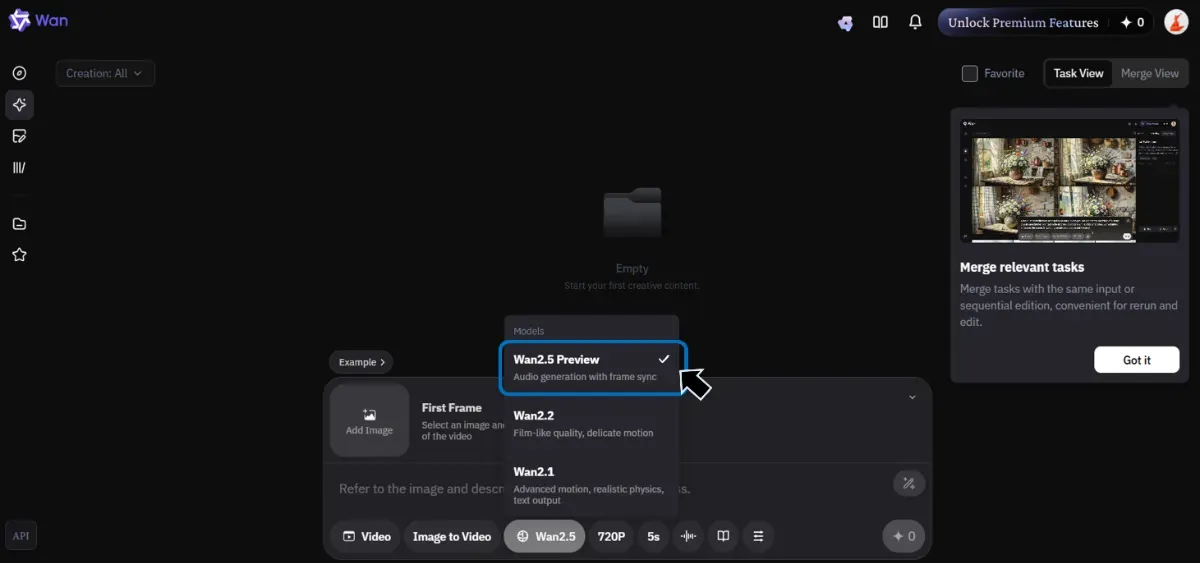
For wan.video, open the generator, choose prompt or image mode, pick the duration/resolution/audio settings, and download the resulting MP4 for your internal editing or distribution workflow.
Business Use Cases
Native audio support rivals Veo 3
Because narration and visuals finalize in one render, you skip the temp VO and timing tweaks that slowed earlier testing. Short hero shots reach shareable quality faster, similar to Veo 3’s workflow.
Parkour to weather shifts: dynamic motion range
Creators highlight how Wan 2.5 handles grounded parkour, multi-character blocking, time-lapse weather shifts, and linked shots without breaking character consistency.
Implementation Checkpoints
Before rolling Wan 2.5 into production, align on these technical and operational guardrails.
-
Regions and endpoints Singapore, Beijing, and other regions use separate endpoints and auth flows. Keep configs per environment.
-
Asynchronous execution Treat the API as async: store task IDs, poll for completion, and define retry/timeout logic.
-
Resolution vs. cost Higher resolutions cost more. Prototype at 480p/720p, then rerender required hero shots at 1080p.
-
Watermark policy The default “Generated by AI” watermark is toggleable. Decide on a consistent policy per channel.
-
SDK readiness Preview builds may lack SDK coverage. Wrap HTTP calls today but design abstractions for future SDK drops.
Start with limited internal pilots to benchmark quality and cost, then scale up duration/resolution settings once requirements solidify.
Takeaways
Wan 2.5’s 10-second, 1080p, 24fps output plus synchronized audio makes it practical for marketing, education, and entertainment teams that need quick proofs of concept. Build wrappers with async polling, plan budgets by resolution, and test on the web UI or API with real prompts and reference images. Once pricing finalizes, you can confidently graduate trials into production workflows.