
Image generation quality depends heavily on prompt design and clear editing instructions. On August 26, 2025, Google announced updates to Gemini’s image generation and editing capabilities, highlighting enhancements in character consistency, conversational precision editing, multi-image composition, and effective prompt creation guidelines. This expands the use cases for the Gemini app, Google AI Studio, and Vertex AI.
This article organizes the latest updates to Gemini’s image generation and editing features, covering key feature characteristics, essential prompt design principles, Google AI Studio operation procedures, and practical use cases.
Table of Contents
- Key Enhancement Areas and Feature Comparison
- Basic Elements of Effective Prompt Design
- Google AI Studio Operation and Verification Workflow
- Real-World Use Cases and Ideas
- Summary
Key Enhancement Areas and Feature Comparison
Each item in the table corresponds to areas enhanced in Gemini’s latest update.
| Feature | Overview | Primary Use Cases |
|---|---|---|
| Character Consistency | Maintains appearance of the same character/subject across multiple generations and edits | Series illustrations, brand mascots, advertising campaigns |
| Local Editing | Precise modification of specific areas using natural language | Product photo color changes, object removal, background replacement |
| Multi-Image Composition | Integrates multiple images into a single scene | Look composition, scene replacement, collage creation |
| Style Application | Transforms appearance, texture, and expression while preserving the subject | Style transfer, design exploration, tone variations |
| Inference (Logic) | Generates based on real-world knowledge, considering continuity and causality | Educational visuals, before/after representations |
Maintaining Character Consistency
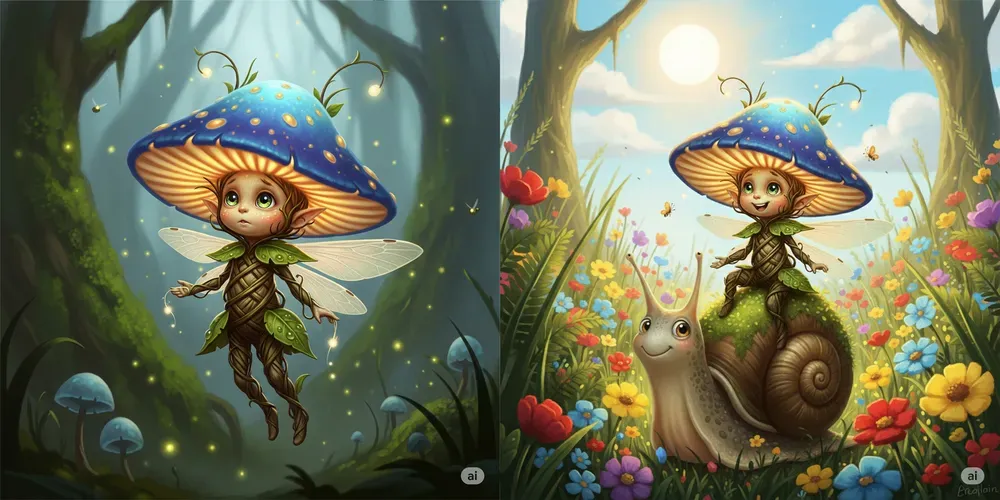
It’s now easier to maintain the appearance of the same person across different scenes, poses, and styles. This is useful for serialized campaigns, unifying characters/mascots in a series, or creating multi-angle mock-ups of the same product. The key is to specify identifiers like hairstyle, clothing, and accessories concretely from the start, and repeat those terms in subsequent prompts. If necessary, attach the same reference image and refine iteratively for stability. However, small facial features and fine details are prone to variation, so when the intent breaks down, explicitly restate the characteristic terms and regenerate for safety.
Prompt Examples:
-
Prompt 1: An illustration of a small mushroom sprite radiating light. The sprite wears a large bioluminescent mushroom cap, has large curious eyes, and a body made of woven vines.
-
Prompt 2 (in the same chat): Depict the same sprite riding on the back of a friendly, moss-covered snail, traveling through a sunny meadow filled with colorful wildflowers.
 Source: https://blog.google/products/gemini/image-generation-prompting-tips/
Partial Modifications Through Conversational Local Editing
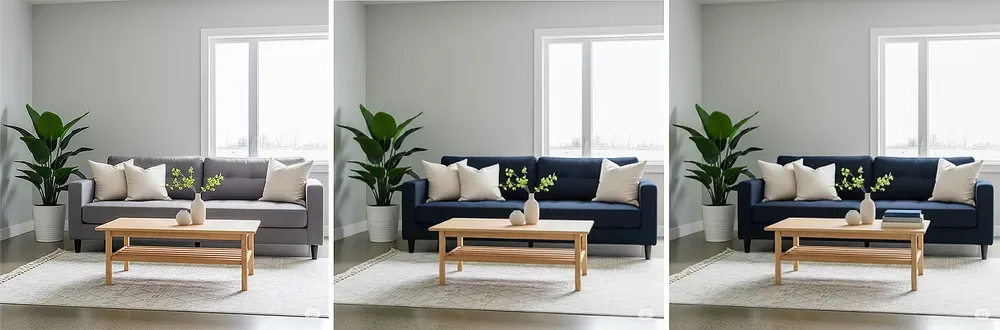
You can now precisely modify specific parts of an image using natural language. This applies broadly to color changes, object removal, background replacement, and even colorizing black-and-white images. Instructions work best with the pattern “target + operation + appearance conditions.” Mask specification is unnecessary, and small incremental additions like “add a book” or “warm the lighting” integrate smoothly. Remember that watermarks (visible/invisible) are applied, and always verify rights for uploaded materials.
Prompt Examples:
-
Prompt 1: A high-quality photo of a modern, minimalist living room with a gray sofa, light wood coffee table, and a large houseplant.
-
Prompt 2 (editing): Change the sofa color to dark navy blue.
-
Prompt 3 (editing): Additionally, add three stacked books on the coffee table.
 Source: https://blog.google/products/gemini/image-generation-prompting-tips/
Multi-Image Integration and Composition
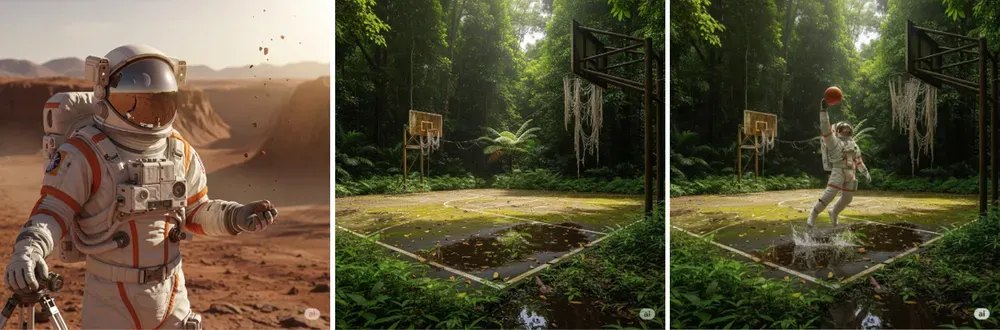
You can understand and merge up to three input images, transferring subjects or applying style transfers into a single scene. For example, when naturally overlaying a logo onto a person’s photo, reducing inconsistency is easier by conforming to fabric wrinkles or specifying light source direction. Inconsistencies in perspective and shadows can cause breakdowns, so adding physical conditions like “match shadows” or “add reflections” improves stability.
Prompt Examples:
-
Prompt 1: Generate a realistic photo of an astronaut wearing a helmet and full suit.
-
Prompt 2: A photo of a grass-covered basketball court in a tropical rainforest.
-
Prompt 3 (upload both and compose): Depict the astronaut dunking a basketball on this court.
 Source: https://blog.google/products/gemini/image-generation-prompting-tips/
Style Transfer and Expression Variations
You can re-render in architectural blueprint style, watercolor style, 90s photo style, etc., while preserving the subject’s shape. This is suitable for design variation exploration and brand tone discovery. Combining the original image with a style source and limiting the transfer target to “color,” “texture,” or “brushwork” makes breakdown less likely. Text and fine detail consistency can be compromised, so adding text in post-production is safer.
Prompt Examples:
-
Prompt 1: A realistic photo of a classic motorcycle parked on a city street.
-
Prompt 2 (editing): Convert this image to an architectural blueprint style.
 Source: https://blog.google/products/gemini/image-generation-prompting-tips/
Contextual Expression Through Inference-Based Generation
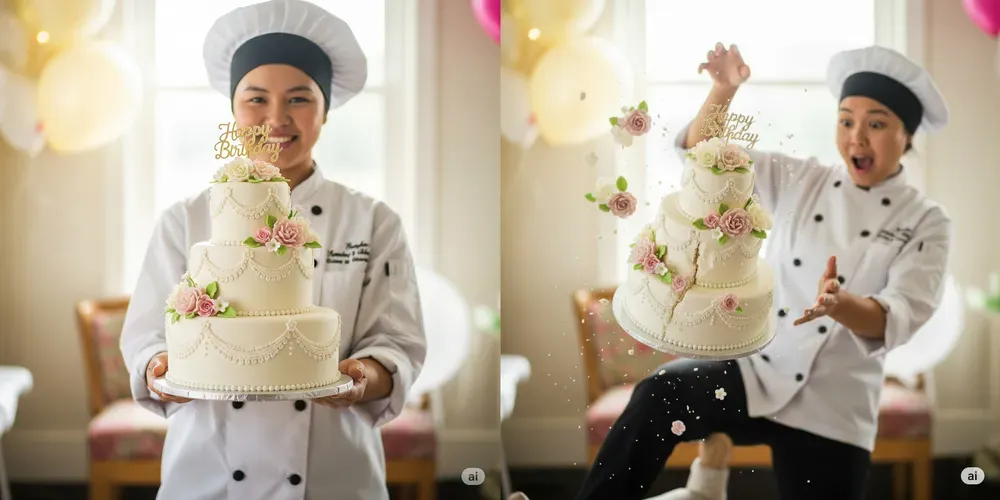
It’s now easier to depict “what might happen next” based on context and real-world knowledge. This is suitable for procedural visuals, safety education, before-and-after representations, and story-based series creation. Fixing the same person, props, and ambient lighting while clearly specifying “changing elements” makes continuity more likely. However, fine facial features, text, and physical representations are error-prone, so operations should assume manual review.
Prompt Examples:
-
Prompt 1: Generate an image of a person standing while holding a three-tier cake.
-
Prompt 2 (in the same session): Generate an image depicting what would happen if that person tripped.
 Source: https://blog.google/products/gemini/image-generation-prompting-tips/
Basic Elements of Effective Prompt Design
To enhance result stability, incorporate the following perspectives into a single sentence.
-
Subject Specify who/what concretely (e.g., a barista robot with glowing blue eyes).
-
Composition Camera angle and framing, such as close-up/wide, low angle, etc.
-
Action What is happening (e.g., brewing coffee).
-
Location Where (e.g., a cafe on Mars, a golden-hour meadow).
-
Style Photorealistic/watercolor/film noir/1990s product photography, etc.
-
Editing Instructions When modifying existing images, specify concretely like “make the tie green” or “remove the car in the background.”
These six elements are fundamental design components that easily improve effectiveness even in short prompts, simply by adding them as needed.
Google AI Studio Operation and Verification Workflow
AI Studio is convenient for end-to-end verification, sharing, and simple app prototyping.
Access AI Studio and select “Nano Banana / Gemini 2.5 Flash Image” in the model selection. Enter text incorporating the six elements mentioned above into the prompt field, and upload images as needed to provide editing targets. Generation results can be fine-tuned conversationally on the same screen, allowing refinements like “slightly warm the background” or “keep the subject the same but make the expression serious.”
Real-World Use Cases and Ideas
Here are curated posts that help you grasp idea hints and business application images.
-
Demo “Figurine-izing” Wedding Photos A case of generating 3D figurine-style images from photos. Expected Use Cases: Visual exploration for commemorative products, e-commerce product mocks, campaign variation proposals.
Gemini でウェディングフォトをフィギュアにしてみた💍
— Google Japan (@googlejapan) September 4, 2025
Nano Banana で画像生成が自由自在🍌
作り方はリプライに👇 pic.twitter.com/D6IcL3F4Ln -
Multi-Image “Fusion” Sample A composition demo merging various images into one. Expected Use Cases: Multi-image composition for visualizing project ideas, unified before/after display, collage proposals.
Google の AI 「Gemini」で
— Google Japan (@googlejapan) September 7, 2025
いろんな画像を融合させてみた
Nano Banana 🍌で画像の編集がめっちゃ便利になりました。 pic.twitter.com/MJZW1RGbZl -
Image Editing Prompt “Template Collection” Thread A practical thread compiling editing instructions to “quickly refine details” and procedures enabling virtual try-on by composing two images. Expected Use Cases: Team prompt standardization, sharing review perspectives, building reproducible operational workflows.
🧵3/4 Advanced composition: Combining multiple images
— Google AI (@GoogleAI) September 9, 2025
Create a new image by combining the elements from the provided images. Take the [element from image 1] and place it with/on the [element from image 2]. The final image should be a [description of the final scene]. pic.twitter.com/3FFD7sin5YImage editing is one of the most popular use cases for @NanoBanana. Try using these image editing prompt templates so you can quickly get the details in your photos just right 🧵
— Google AI (@GoogleAI) September 9, 2025
(tip: bookmark this thread for future reference!)
Summary
Gemini’s image generation has become easier to iterate and control through enhancements in character consistency, conversational local editing, and multi-image composition. The key to stabilizing results is short but concrete prompt design incorporating the six elements: Subject, Composition, Action, Location, Style, and Editing. Operationally, building in review and regeneration loops and cost estimation without straying from implementation is essential, premised on SynthID watermarks and current constraints (text rendering, aspect ratios, etc.). Start with small-scale verification by remixing templates in AI Studio’s Build mode and adjusting prompts to your materials and requirements.
You may also want to read